

🎧 Listen to this article
Prefer to listen? An audio version of this article is available for accessibility and convenience.
Apple Watch in watchOS 26 ships with over 40 built-in faces, and at least six of them exist purely to make you — and anyone glancing at your wrist — grin. Snoopy naps on his doghouse, Mickey Mouse points at the hours with his actual arms, and your own Memoji winks back when you raise your wrist. The catch is that Apple buries these behind rows of utility faces in the Face Gallery, so unless you deliberately scroll past Modular, Infograph, and every serious complication layout, you might never find them.
Apple’s decision to front-load the practical faces in the Gallery makes sense from a productivity standpoint, but it does mean the faces with the most personality get treated as an afterthought. That is a real shame, because the entertaining faces showcase some of the most technically impressive animation work watchOS has to offer.
 Ad
AdSnoopy and Woodstock Steal the Show
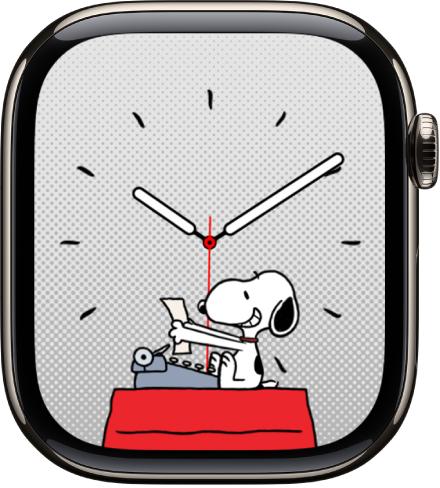
The Snoopy face, introduced in watchOS 10 and refined through watchOS 26, is the single most charming thing Apple has ever put on a wrist. Snoopy and Woodstock perform dozens of distinct animations that change based on the time of day and your local weather conditions — raise your wrist during a rainstorm and Woodstock huddles under a tiny umbrella. Check in the morning and Snoopy stretches awake on top of his doghouse.
Every animation is hand-drawn in the classic Peanuts style, not 3D rendered, and that choice gives the face a warmth no other watch face matches. It does, though, mean you sacrifice complication density. Snoopy supports only two complication slots — top and bottom — so anyone who depends on a grid of fitness metrics or calendar events has to choose between personality and information. Apple documents the full list of available complications for each face in its watchOS Face Gallery guide.
Mickey and Minnie Tell Time the Old-Fashioned Way
Mickey and Minnie have been on Apple Watch since the very first model in 2015, and the concept has never changed: the character stands center-screen with arms that physically rotate to indicate hours and minutes. Tap the display and Mickey speaks the current time aloud. Kids love it. Adults who discover it by accident tend to tap it three more times just to hear it again.
You get a choice between Mickey and Minnie, several color backgrounds, and up to three complications. On a 41mm Apple Watch Series 11, though, Mickey’s arms shrink enough that reading the exact minute takes an extra beat compared to a digital layout. The 45mm or 46mm case gives the character room to breathe, and the detail in the gloves becomes genuinely crisp.
If you are already thinking about pairing a playful face with a band that matches the energy, the coolest Apple Watch bands for 2026 are worth a look.
 Ad
AdMemoji Puts Your Own Face on the Dial
Memoji drops a custom or preset character front and center, and what makes it entertaining is the randomness. The character’s expression changes every time you raise your wrist — one moment waving, the next laughing, and occasionally staring off with a look of mild existential boredom. You never quite know what you are going to get, and honestly, is that not exactly what a watch face should do when the point is fun rather than function?
Building a Memoji that genuinely resembles you takes about five minutes in the Watch app on iPhone. Apple’s customization depth is impressive: freckles, hearing aids, headwear, glasses, piercings, and dozens of hairstyles mean the avatar can represent who you actually are rather than a generic cartoon stand-in. This is also the face that sparks the most conversations with people who had no idea their Apple Watch could do this.
Toy Story Characters Deserve More Wrists
Buzz Lightyear strikes a pose. Woody tips his hat. Jessie spins her lasso. The Toy Story face rotates through all three with full 3D animations that hold up beautifully on the Apple Watch always-on display, though the character motion only triggers on wrist raise.
My one real frustration with this face: Apple has never expanded the character roster beyond these three. Slinky Dog, Rex, and the Little Green Aliens would be perfect additions, and after years of the same trio the repetition starts to settle in. The face itself is beautifully executed — the complaint is that Apple seems to have abandoned it after the initial release, which is a strange choice for one of the most beloved Pixar franchises ever made.
Two Visual Faces Worth the Scroll
Not every entertaining face needs a licensed character. Kaleidoscope transforms any photo from your library into a shifting symmetrical pattern on every wrist raise — choose a photo with bold colors and the effect is genuinely hypnotic. Artist generates millions of unique compositions algorithmically, producing something closer to abstract gallery art than a traditional clock display.
Both support complications and look striking on the always-on display, which makes them more practical for daily wear than the character faces if you still want quick access to weather or activity rings.
The comparison below shows what each entertaining face trades away for its personality.
| Face | Animation Style | Max Complications | Best Display Size |
|---|---|---|---|
| Snoopy | Weather-reactive, hand-drawn | 2 | Any |
| Mickey / Minnie | Arm-based time, tap-to-speak | 3 | 45mm+ |
| Memoji | Random expressions on raise | 2 | Any |
| Toy Story | 3D character rotation | 3 | Any |
| Kaleidoscope | Photo-based shifting patterns | 3 | Any |
| Artist | Algorithmic abstract art | 1 | Any |
Find and Set Up These Faces in Under a Minute
Open the Watch app on your iPhone and tap the Face Gallery tab at the bottom of the screen. Scroll past the featured and utility rows until you reach the character and artistic options — Apple organizes them roughly by category, but the entertaining faces tend to sit further down than they should. Tap any face to preview it, adjust the complication slots to your preference, and hit Add. The face appears on your Apple Watch immediately.
Here is the trick that changes everything about living with multiple faces: you can store as many as you want and swipe between them by pressing and holding the current face, then swiping left or right. Keep a serious Infograph layout for work hours and a Snoopy face for evenings, switching with a single gesture. If you have already explored building a custom Apple Watch face, adding a fun face to your rotation takes less than a minute.
Anyone curious about going further should know that three apps unlock thousands of additional watch faces from independent designers. Third-party faces run as apps rather than native watch faces, so they lack the deep complication integration of Apple’s own options — but the creative range is enormous.
Your Apple Watch already has the faces that make people lean in and ask what is on your wrist. They are sitting further down the Face Gallery than they deserve.

Related Posts
Apple Watch vs WHOOP 5.0: Which Is Better for Fitness?
Apr 17, 2026
Every Apple Watch That Runs watchOS 26 — And the Catch
Apr 16, 2026
How watchOS 26.4 Fixed the Workout App — and What Else Changed
Apr 14, 2026