

🎧 Listen to this article
Prefer to listen? An audio version of this article is available for accessibility and convenience.
watchOS 26 runs on Apple Watch Series 6 and newer, the Apple Watch SE starting with the second generation, and every Apple Watch Ultra ever made. That's a broader group than most people expect — if you bought your Apple Watch any time after late 2020, there's a good chance it's on the list.
But compatible isn't the same as fully featured, and that's where it gets interesting. One of watchOS 26's biggest new additions — Workout Buddy, the AI coaching feature that analyzes your fitness history and talks you through sessions in real time — doesn't actually run on the watch. It runs on your paired iPhone. Which means you could have a Series 11 on your wrist and still be locked out of that feature if your phone doesn't support Apple Intelligence. That's not a small asterisk.
 Ad
AdThe Devices That Make the Cut
- Apple Watch SE (2nd generation and 3rd generation)
- Apple Watch Series 6, Series 7, Series 8, Series 9, Series 10, and Series 11
- Apple Watch Ultra, Apple Watch Ultra 2, and Apple Watch Ultra 3
If your watch predates Series 6 — that covers the original SE, Series 3, Series 4, and Series 5 — no watchOS 26 update will appear. Those models have been retired from the update path.
Worth flagging: the update also requires an iPhone 11 or later paired with iOS 26. If your iPhone doesn't qualify for iOS 26, the watch can't update either, regardless of which model it is. The update chain stops at the phone.
What Everyone Gets
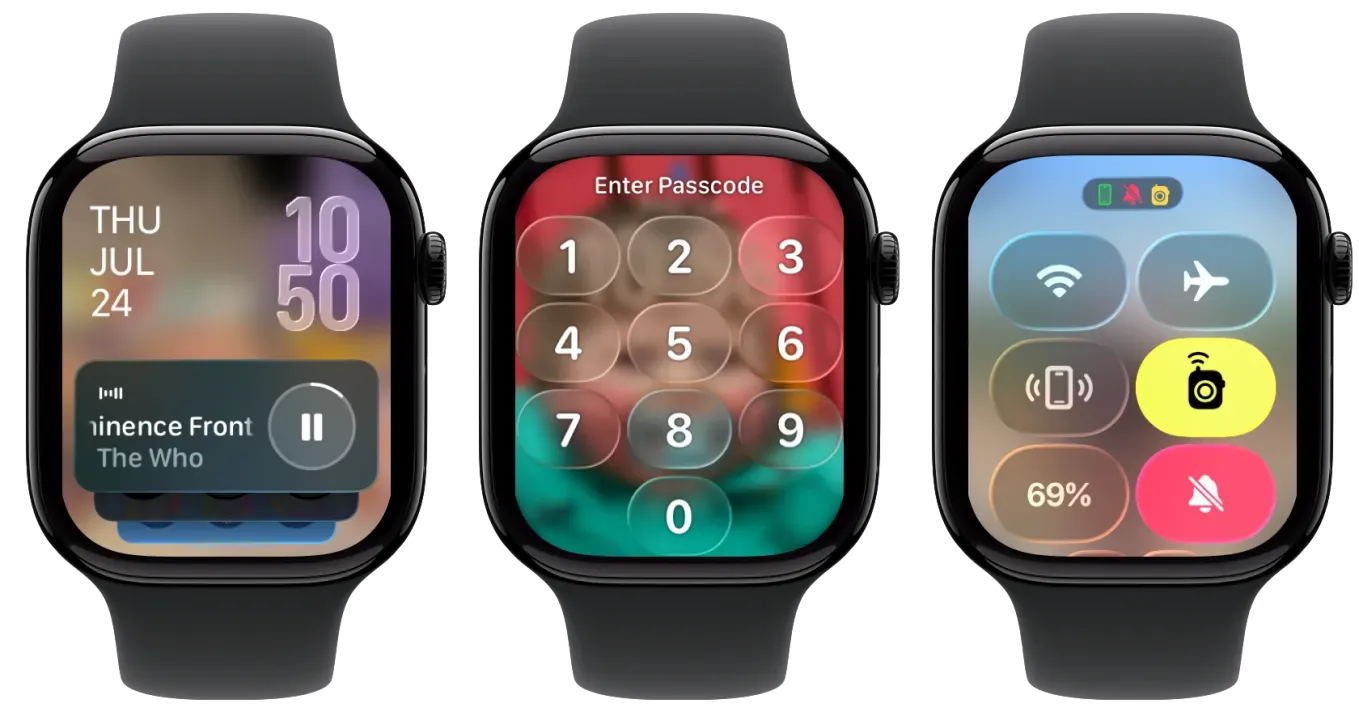
Liquid Glass is the most immediately visible change. Apple's new translucent, reflective interface design shows up everywhere in watchOS 26 — menus, notifications, the Smart Stack, the lock screen, system apps. It's not a subtle visual tweak. The whole interface reads differently, with a depth to it that didn't exist in watchOS 25 and earlier. Automatic volume adjustment ships alongside it, quietly detecting ambient noise and scaling your media volume up or down without you touching anything — the kind of feature that stops feeling like a feature once it's working.
The Smart Stack prediction algorithms got smarter in a practical way. The system now factors in more contextual data — what you're doing, where you are, recent sensor readings — to surface relevant cards before you think to look for them. If you've been in the habit of ignoring the Smart Stack, this is a reasonable moment to give it another try.
The Workout app received a meaningful redesign. You can now customize the data views inside each workout type, so you're not stuck staring at default metrics that don't match how you train. The improvements that landed in watchOS 26.4's workout app update built on what shipped with watchOS 26 itself, so the full experience is better than what launched at the OS release.
Notes arrives on Apple Watch in watchOS 26 — you can create and view notes from your wrist without touching your phone. Messages gains Live Translation for conversations in other languages, custom backgrounds, and poll voting. The Phone app adds Call Screening, which transcribes a caller's opening before you commit to picking up, and Hold Assist, which monitors when the other party comes off hold and notifies you so you're not stuck listening to elevator music on a loop.
The table below shows what each Apple Watch model gets in watchOS 26. Most features are universal — the differentiation is narrower than Apple's marketing might suggest.
| Feature | SE (2nd/3rd Gen) | Series 6–11 | Ultra (All) |
|---|---|---|---|
| Liquid Glass design | ✓ | ✓ | ✓ |
| Redesigned Workout app | ✓ | ✓ | ✓ |
| Notes app on Apple Watch | ✓ | ✓ | ✓ |
| Messages Live Translation | ✓ | ✓ | ✓ |
| Call Screening & Hold Assist | ✓ | ✓ | ✓ |
| Workout Buddy | iPhone 15 Pro+ req. | iPhone 15 Pro+ req. | iPhone 15 Pro+ req. |
| Live Listen real-time captions | ✓ | ✓ | ✓ |
| Action button (Control Center) | — | — | ✓ |
 Ad
AdWorkout Buddy and the iPhone Problem
Workout Buddy analyzes your historical fitness data, motivates you during workouts, and delivers session summaries afterward. Apple gave it prominent placement in the watchOS 26 announcement. The part that got less emphasis: it requires Apple Intelligence, which runs on the iPhone paired with your watch.
The supported iPhones for Apple Intelligence are iPhone 15 Pro, iPhone 15 Pro Max, iPhone 16, iPhone 16 Plus, iPhone 16 Pro, iPhone 16 Pro Max, iPhone 17, iPhone 17 Plus, iPhone 17 Pro, and iPhone 17 Pro Max. The iPhone 14 lineup, iPhone SE third generation, and anything older are out.
If your phone isn't on that list, Workout Buddy isn't available to you — regardless of which Apple Watch you're wearing. I think that's a frustrating design choice. The limiting factor for one of watchOS 26's headline features is hardware that sits in your pocket, not hardware you specifically bought to improve your fitness tracking. There's no workaround; you wait until your iPhone is due for an upgrade.
The life-saving features your Apple Watch already has — fall detection, crash detection, emergency SOS, Medical ID — are completely unaffected by any of this. Those run on the watch itself and are available on every compatible watchOS 26 model.
What Ultra Models Get Exclusively
In watchOS 26, Apple Watch Ultra models gain one thing the Series and SE lineup doesn't get: the ability to assign Control Center actions to the action button. The action button on Ultra watches has always been configurable, but this specific Control Center assignment capability is new to watchOS 26 and exclusive to Ultra hardware.
That's the only watchOS-level distinction. The Ultra models still differ from other Apple Watch hardware in all the ways they always have — titanium casing, extended battery life, deeper water resistance ratings, the larger display — but those are hardware differences, not software features the OS unlocks differently per model.
The Accessibility Jump in watchOS 26
Live Listen gets a meaningful expansion in watchOS 26. The feature now generates real-time captions for everything the watch's microphone picks up — not just phone calls. For users who are deaf or hard of hearing, that changes the practical value of Live Listen significantly. It turns the watch into an ambient captioning device for in-person conversations. Enabling it is straightforward: go to Accessibility in the Watch app on your iPhone, find Live Listen, and turn on captions.
From a cognitive accessibility standpoint, watchOS 26 is consistent about its gesture patterns — the Smart Stack swipe, the wrist flick for dismissing notifications, the Crown navigation. Users with ADHD or memory-related challenges can build reliable muscle memory because the interaction model doesn't shift unpredictably from screen to screen.
If You're on an Older Compatible Watch
Apple Watch Series 6 running watchOS 26 gets essentially the same feature set as a Series 11 running watchOS 26 — with the only meaningful differences being the Workout Buddy iPhone dependency, which applies to everyone equally, and the Ultra action button, which is hardware-specific. Apple didn't tier the features within the compatible range beyond those two exceptions.
The realistic thing to say about Series 6 and the original Apple Watch SE second generation is that watchOS 26 is likely the last major update those models will see, or close to it. Apple's typical support window for Apple Watch runs about four to five years from the hardware release date, and Series 6 shipped in September 2020. Installing the update is worthwhile — you get everything everyone else gets. Just don't expect another complete platform refresh for that hardware next cycle.

Related Posts
Apple Watch vs WHOOP 5.0: Which Is Better for Fitness?
Apr 17, 2026
How watchOS 26.4 Fixed the Workout App — and What Else Changed
Apr 14, 2026
The Apple Watch Faces That Actually Make People Smile
Apr 11, 2026