
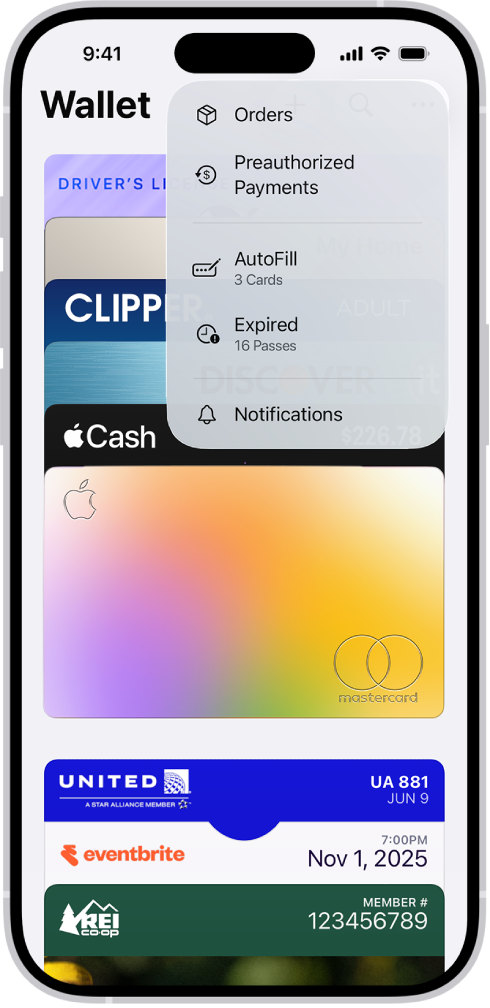

iOS 26 added genuine order tracking to the Wallet app, and it works better than its buried placement would suggest. Open Wallet, tap the three-dot menu in the top-right corner, and a new Orders section surfaces every in-transit package and a log of past deliveries, all pulled from your inbox automatically. The catch is that the feature requires Apple Intelligence, reads only Apple Mail, and still carries a beta label. It does, though, work — and the setup takes under a minute once you find the right toggle.
Apple calls it “Order Tracking (Beta).” The way it functions is different from how most people assume: Wallet doesn’t connect directly to UPS, FedEx, or USPS the way a dedicated tracking app would. Instead, Apple Intelligence scans your Apple Mail inbox for order confirmation and shipping update emails, then consolidates that information inside Wallet. If a merchant emails you when your order ships and again when it’s out for delivery, Wallet picks up both. If a merchant sends only one notification, that’s all you’ll see.
 Ad
AdWhat the Orders view actually shows you
Finding Orders requires a bit of hunting the first time, which feels like Apple hedged on how prominently to feature something still in beta. Tap the three dots in the top-right corner of the Wallet app and it appears in the dropdown — there’s no dedicated button on the main screen. Inside, you’ll find two lists: active orders still in transit and a history of past orders organized by retailer. Each card shows the delivery window and any status updates Wallet pulled from your email. The three-dot menu placement means most people will only discover this if they hear about it from somewhere other than Apple itself.
It’s genuinely useful, and I also really like that it consolidates purchases regardless of how you paid. Orders placed with Apple Pay sit alongside orders made with a credit card or PayPal — the feature isn’t restricted to Apple’s own payment system. Where things get messy: subscription renewal receipts, restaurant curbside pickup orders, and digital purchases can surface as trackable orders, adding noise you didn’t ask for. You can delete individual entries or block a merchant from ever appearing again, but keeping the list tidy is a manual habit.
Setting it up
Order tracking doesn’t activate on its own, and the toggle that enables it is genuinely easy to miss. Go to Settings, tap Wallet & Apple Pay, then select Order Tracking. Inside, you’ll see a toggle for Mail (Beta) — that’s the one to flip on. Most people visit Wallet & Apple Pay once when adding a card and never return, which is likely why this feature is sitting unused on a lot of iPhones right now. There are no notifications asking you to try it, no onboarding prompts, no banner in the Wallet app itself.
There’s also a “Track” button that can appear inside shipping emails directly in the Mail app. Tapping it prompts iOS to ask permission to let Wallet access relevant emails — a useful option if you’d rather approve access per order rather than all at once upfront. Both methods land in the same place; the Settings toggle just handles everything going forward without any extra steps.
If you want delivery status visible on your Lock Screen and Dynamic Island while a package is in transit, pairing this with Live Activities is worth doing. iOS 26 expanded what shipping apps can surface through that system, and the combination gives you an ambient countdown without having to open anything. The full guide to Live Activities setups worth trying in iOS 26 is the place to start.
 Ad
AdWhat Apple’s feature description leaves out
Wallet doesn’t connect directly to carrier systems — and that distinction matters more than it looks.
A dedicated tracking app like Deliveries or ParcelTrack connects to carrier APIs directly and can show you real-time scan data — when a package entered a sorting facility, when it cleared a hub, when a driver scanned it at your door. With Wallet, you see exactly what your merchant chose to email you. For standard orders from major retailers like Amazon, Target, or Walmart, that’s often plenty — those companies send multiple shipping updates, and Wallet surfaces them cleanly. The issue is that this creates a false sense of parity: Wallet looks like a tracking dashboard, but it’s actually a curated view of your email.
The gap shows up with smaller retailers that send a single shipping notification and nothing else. In the worst case — a package still sitting in a warehouse a week after the “Shipped” email — Wallet will show you “Shipped” and offer no further information until the next merchant email arrives. The tracking number is in that original email. Wallet just doesn’t hand it off to a live carrier system automatically.
Which iPhones can use it
Apple Intelligence is a hard requirement, which limits Order Tracking to iPhone 15 Pro and 15 Pro Max, and any iPhone 16 or iPhone 17 model — including the iPhone 16 Plus, iPhone Air, iPhone 17, iPhone 17 Plus, iPhone 17 Pro, and iPhone 17 Pro Max. Standard iPhone 15, the entire iPhone 14 lineup, and any older model won’t see the Order Tracking submenu in Settings at all.
Apple Intelligence also needs to be enabled separately before the feature works. Head to Settings, then Apple Intelligence & Siri, and enable it there first. The Order Tracking toggle won’t respond without it. The feature is also US-focused for now — Apple’s approach with Wallet capabilities has consistently been to launch in the United States first and expand later, and this follows that pattern. If you’re outside the US, availability may be limited or unavailable. iOS 26 has made a number of similar under-the-radar improvements to how the iPhone handles everyday tasks; the rundown of everything iOS 26 quietly rewrote puts Order Tracking in broader context.
When it’s actually worth setting up
Order tracking in Wallet earns its place if Apple Mail is your primary inbox and you do consistent online shopping — not the occasional purchase, but the kind of regular volume where you’re losing track of what’s coming from where. The scenario that justifies it best is holiday season: multiple packages, overlapping delivery windows, the low-level background anxiety of not knowing which order is arriving when. Having everything consolidated in one place, even without live carrier data, removes most of that mental overhead.
If your main inbox is Gmail, Outlook, Spark, or any other non-Apple email client, this feature won’t reach those emails. The Mail-only limitation is a genuine constraint — and one Apple should address as Order Tracking moves out of beta. For now, the practical option is routing shopping confirmation emails through an address you read in Apple Mail, even if that’s a secondary account set up specifically for purchases. It’s a workaround, but not a complicated one.

Related Posts
iOS 26.4 Hid a New Apple Account Design Inside Every App
Apr 30, 2026
iOS 26.4.2 Is Out — It Fixed the iPhone Privacy Flaw the FBI Already Used
Apr 24, 2026
What the iPhone Action Button Does When You Set It Up Right
Apr 20, 2026