

🎧 Listen to this article
Prefer to listen? An audio version of this article is available for accessibility and convenience.
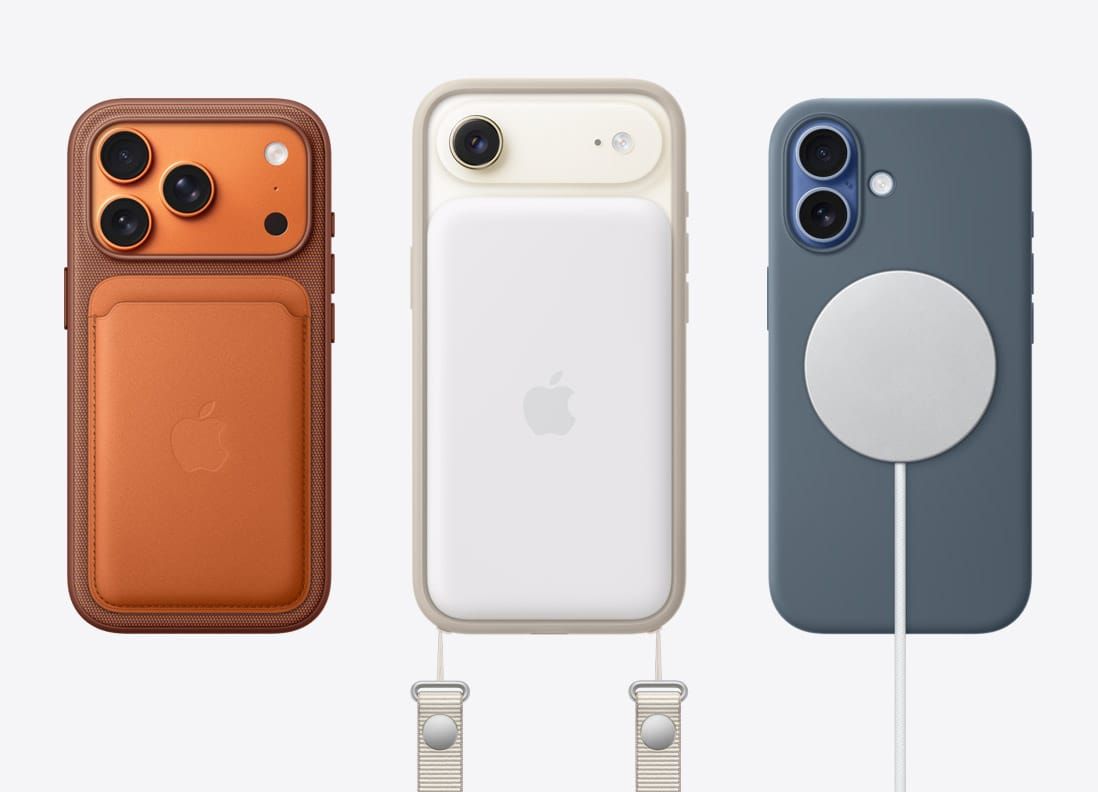
The iPhone 17 uses a completely new aluminum frame, and your old iPhone 16 case will not fit it. Apple changed the dimensions, redesigned the camera bump, and repositioned the buttons, so every iPhone 17, 17 Pro, and 17 Pro Max needs a case built specifically for its model. The lone exception is the iPhone 17e, which shares dimensions with the iPhone 16e.
But here is the part nobody mentions in the product listings. A case that technically fits can still damage your phone if it traps heat against the aluminum, blocks the Camera Control button, or skips MagSafe alignment. I have seen cases advertised as "compatible" that cover the Camera Control cutout with a mushy silicone overlay, killing every gesture the button supports. Picking the right case is not about finding one that snaps on. It is about finding one that works with the phone.
Here is how to get it right on the first try.
 Ad
AdWhy Your iPhone 16 Case Does Not Fit
The iPhone 17 is 2 millimeters taller and 0.15 millimeters thicker than the iPhone 16. That sounds trivial. In practice, it leaves the bottom edge exposed, the camera cutout misaligned, and the button holes in the wrong spot.
The camera bump is the real problem. On the standard iPhone 17, Apple kept a vertical dual-lens layout, but the bump is taller and slightly wider. On the Pro models, Apple went with a horizontal rectangular plateau that stretches nearly the full width of the phone. Put a 17 Pro into a 16 Pro case and the camera cutout will not come close to lining up. You are looking at a lens partially covered by case material, which affects image quality and scratches the sapphire lens cover over time.
The Pro models also switched from titanium to aluminum this year. Apple’s own specs page confirms the change. Aluminum dissipates heat differently than titanium, and a tight-fitting case can trap more warmth against the frame during long FaceTime calls or gaming sessions with the Apple A19 Pro chip working hard.
The Camera Control Problem Nobody Warns You About
The Camera Control button on the lower right edge is not a regular button. It is a pressure-sensitive, capacitive touch surface that responds to light presses, hard presses, and sliding gestures. Think of it as a tiny trackpad built into the side of your phone.
A cheap silicone overlay kills the capacitive touch entirely. You can still mash hard enough to trigger the shutter, but the light-touch features vanish. No sliding to zoom. No quick settings swipe. No half-press to lock focus. Apple’s Camera Control documentation confirms the button uses both a force sensor and a capacitive sensor, and both need direct contact with your finger.
Well, what should you look for? A proper cutout. Not a covered button, not a thin membrane, not a "tactile overlay." A clean, open channel that lets your finger touch the actual button surface. Some case makers use a recessed guide that protects the surrounding frame while leaving the sensor exposed. That is the right approach.
I mean think about it. Who does not use their phone camera? This is the single most important thing to check before buying a case.
 Ad
AdMagSafe Alignment Is Not Optional Anymore
MagSafe on the iPhone 17 charges at up to 25 watts wirelessly. That is a real speed bump, and it only works when the magnet alignment is precise. A case without proper MagSafe rings drops you to basic Qi at 7.5 watts. The difference between a 30-minute top-up and a 90-minute crawl.
Every MagSafe-compatible case needs an embedded magnet array that matches the phone’s internal alignment ring. If the magnets are even slightly off-center, your charger will attach but charge slowly, or the connection breaks if you bump the nightstand. The simplest test: put your phone in the case, attach a MagSafe charger, and check that the charging animation appears immediately. Nudge the charger. If it disconnects with a light tap, the alignment is off. Return the case.
Which Material Actually Protects Aluminum
Case materials are not created equal, and the aluminum frame changes the equation. Aluminum scratches more easily than stainless steel or titanium. It dents if you drop it onto a hard corner. The material you choose directly determines how that frame looks after six months.
How each iPhone 17 model changes your case requirements at a glance:
| Model | Frame | Camera Bump | Case Fit |
|---|---|---|---|
| iPhone 17 | Aluminum | Vertical dual-lens | New (not iPhone 16) |
| iPhone 17 Pro / Pro Max | Aluminum (was titanium) | Wide horizontal plateau | New (not iPhone 16 Pro) |
| iPhone 17e | Aluminum | Compact single-lens | Fits iPhone 16e cases |
| iPhone 17 Air | Titanium-aluminum hybrid | Full-width camera bar | New (ultra-thin profile) |
TPU is the workhorse. Flexible, shock-absorbing, affordable. Most hybrid cases pair a TPU bumper with a polycarbonate back plate. This is what I would recommend to most people because it handles drops well without adding bulk. The downside: clear TPU yellows within three to six months.
Silicone feels great in the hand. Grippy, warm, pleasant. Apple sells silicone cases for the standard iPhone 17 in fuchsia, ultramarine, star fruit, and lake green. Decent scratch protection, but less impact absorption than TPU. If your phone hits concrete from table height, silicone alone probably will not save the corners.
TechWoven replaced the disastrous FineWoven material. It is only available for the Pro and Pro Max at 59.99 dollars. Recycled polyester fabric, more durable than FineWoven, but still scuffs if you toss your phone into a bag with keys. Apple charging sixty dollars for a fabric case while offering silicone at the same price is a strange choice. The silicone protects better.
Five Models, Five Different Cases
This is where it gets interesting. Apple made every iPhone 17 variant different enough that you cannot just grab any case with "iPhone 17" in the title.
The standard iPhone 17 measures 149.6 by 71.5 millimeters and weighs 177 grams. Vertical camera bump, traditional layout, widest case selection. If you are still deciding between models, our comparison guide breaks down which one deserves your money.
The Pro and Pro Max demand cases with that massive horizontal camera plateau cutout. The Pro is 8.75 millimeters thick; the Pro Max stretches to 163.4 millimeters tall. Neither fits the other’s case. The camera plateau adds roughly 4.4 millimeters of protrusion, so any case without a raised lip around the camera is pointless.
The iPhone 17e is the easy one. Identical dimensions to the iPhone 16e, so existing cases fit. The only new consideration: MagSafe. The 17e is the first budget iPhone to include MagSafe, so make sure your case has magnetic alignment if you want full-speed wireless charging.
The iPhone 17 Air is the wild card. At 5.5 millimeters thin, it is dramatically thinner than any previous iPhone, with a full-width camera bar across the top. Cases need to be ultra-slim to preserve the thinness, while still providing enough protection that it survives sliding off a couch cushion. The case market for the Air is still catching up.
What to Actually Check Before You Buy
- Camera Control cutout — Clean open cutout, not a silicone membrane. If the listing photos show a covered button, skip it.
- MagSafe magnet ring — The listing must say MagSafe or Qi2. "Wireless charging compatible" usually means basic 7.5-watt Qi.
- Raised camera lip — At least 1 millimeter above the lens surface. Anything less and your camera glass touches flat surfaces every time you set the phone down.
- Model-specific fit — Confirm the listing specifies your exact model. iPhone 17 and iPhone 17 Pro are not interchangeable.
One more thing. If your iPhone storage is filling up, do not assume a bulky battery case solves the problem. Those cases add weight, heat, and bulk for a software issue that iOS 26 can fix for free. Clean up your storage first.
Accessibility and Everyday Grip
The aluminum frame is slightly more rounded than previous models, which helps users with limited hand mobility get a grip. But that roundness also means the phone slips more easily. A textured TPU or silicone case adds friction without adding bulk, and for some users that is the difference between a secure hold and a cracked screen.
For VoiceOver users, the Camera Control button’s capacitive surface works with VoiceOver gestures, but only through a clean cutout. A membrane overlay disrupts the capacitive detection that VoiceOver depends on, turning the button into a basic shutter trigger and losing its accessible gesture support. Nobody lists "breaks VoiceOver Camera Control gestures" in the product description, but that is exactly what happens with a cheap covered overlay.

Related Posts
iOS 26.4.1 Fixes the iCloud Bug That Broke Your Apps
Apr 09, 2026
iOS 26.4 Drains Your iPhone Battery. Here’s What Fixes It
Apr 09, 2026
Your iPhone Finally Lets You Create Custom Ringtones in iOS 26
Apr 08, 2026