

🎧 Listen to this article
Prefer to listen? An audio version of this article is available for accessibility and convenience.
Your Apple Watch can do something your phone can’t — it stays on your wrist when everything goes wrong. A hard fall. A car crash. No cell signal on a remote trail. Apple packed watchOS 26 with features that respond to all three, and the uncomfortable truth is that most people wearing an Apple Watch right now have never configured half of them.
Fall Detection, Crash Detection, Emergency SOS, and Medical ID are the headline safety tools, but the setup matters as much as the hardware. Apple auto-enables some of these features for certain age groups and quietly leaves them off for everyone else, which means a 40-year-old with an Apple Watch Series 11 might have fewer safety nets active than a 60-year-old wearing an SE. Getting the full protection layer takes about five minutes, and the payoff is the kind of thing you never appreciate until the one time you actually need it.
 Ad
AdHow Fall Detection and Crash Detection Actually Work
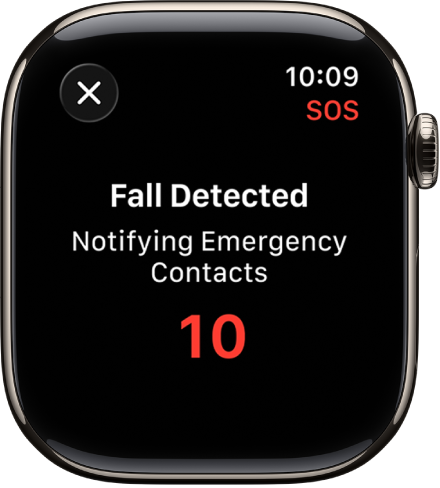
Fall Detection leans on the accelerometer and gyroscope inside your Apple Watch to spot the sudden, high-force motion of a hard fall. Apple says those sensors measure up to 32 g-forces. When it detects one, the watch taps your wrist, blares an alarm, and asks if you’re okay. Stay still for about a minute without responding and a 30-second countdown begins. Then the watch calls emergency services and texts your location to every emergency contact you’ve set up.
Here’s the part that surprises people. Apple auto-enables Fall Detection for users age 55 and older. That cutoff used to be 65. If you’re between 18 and 54, the default is “Only on during workouts,” which means a fall at home, in the garage, or on ice in the driveway goes undetected unless you flip the switch yourself. Do it now: open Settings on your watch, tap SOS, and toggle Fall Detection to “Always on.”
Crash Detection is a different animal entirely. It uses a high-g-force accelerometer rated for 256g, a gyroscope sampling more than 3,000 times per second, the barometer for pressure changes that come with sudden cabin deformation, GPS for speed data, and even your paired iPhone’s microphone to detect the sound of impact. When all five sensors agree you just had a severe car crash, a 20-second countdown starts. No response from you? The watch dials emergency services and plays a looped audio message to the dispatcher in the local language, repeating every five seconds so someone hears it even if the phone landed under a seat. Available on Apple Watch Series 8 and later, Apple Watch SE second generation, and every Apple Watch Ultra model.
Crash Detection is on by default. Leave it there.
 Ad
AdEmergency SOS, Including the Satellite Connection
Every Apple Watch running watchOS 26 can call emergency services. Press and hold the side button until the sliders show up, drag the Emergency Call slider, and you’re connected. Hold the button even longer, past the slider screen, and a countdown starts that dials automatically. You don’t have to swipe anything.
The Apple Watch Ultra 3 pushes this further with Emergency SOS via Satellite. When you’re outside cellular and Wi-Fi range, the watch connects directly to Globalstar satellites for a text-based conversation with emergency dispatchers. You answer tap-based questions about your situation, the watch guides you to point it toward a satellite, and the connection starts. It sends your Medical ID, GPS coordinates, elevation, and battery life without you typing a word. Apple includes two years of satellite SOS free with every Apple Watch Ultra 3 activation.
One friction point worth knowing: the satellite connection needs a clear view of sky and a dry watch face. Dense tree canopy or rain on the display slows things down noticeably. It works, but do not expect the speed of a cell call. If you’re choosing between Watch models and the satellite feature matters to you, this comparison of the Apple Watch Series 11 and Ultra 3 breaks down exactly which features land on which wrist.
Medical ID Is Two Minutes of Setup That Matters Most
Medical ID might be the most underrated safety tool on any Apple device. Open the Health app on your iPhone, tap your profile picture, and tap Medical ID. Fill in your conditions, medications, allergies, blood type, and emergency contacts. Then enable “Show When Locked” — the toggle most people skip, and the one that lets a first responder pull up your information from the lock screen without a passcode.
When Fall Detection or Crash Detection triggers an emergency call in the United States or Canada, your Medical ID automatically transmits to the dispatcher. The paramedic arriving on scene knows about your drug allergy before you’re awake enough to mention it. Apple explains the full configuration steps on its support page for Medical ID in the Health app, and the layout shifted slightly in iOS 26, so follow their current walkthrough.
Your Apple Watch already monitors your heart for irregular rhythms and can flag problems before you feel symptoms. Pairing those health alerts with a completed Medical ID means emergency responders get the full picture — not just what the watch detected, but your entire medical context.
Water Lock, Siren, and the Depth App
Water Lock kills touch input so water doesn’t register phantom taps during a swim. Tap the water drop in Control Center, or just start a swim workout and it engages on its own. To unlock, press and hold the Digital Crown. The watch then plays a series of tones that physically push water out of the speaker using sound vibrations.
Sounds strange. Works perfectly.
The Siren on every Apple Watch Ultra hits 86 decibels — roughly equivalent to a blender at full speed — and carries up to 600 feet. Press and hold the Action Button to start it. For hikers, trail runners, or anyone who spends time in areas with unreliable cell coverage, the Siren bridges the gap between “I have no signal” and “someone actually heard me.” It runs for hours.
The Depth app activates automatically once you’re a meter below the surface. On Apple Watch Ultra models it tracks depth to 40 meters with water temperature. Apple Watch Series 10 and Apple Watch Series 11 support it too, but cap out at 6 meters. Apple is clear about this: it is not a dive computer. No decompression data, no gas analysis. Bring a backup gauge.
Accessibility and Clarity
Fall Detection and Emergency SOS are among the most consequential accessibility features Apple ships. For anyone with a mobility impairment, the automatic emergency call after sustained immobility removes the need to physically reach a phone. The haptic and audio alerts serve users with varying hearing abilities, though I think Apple leans too heavily on audio cues during the countdown. A more prominent visual countdown bar on the watch face would help users who cannot hear the chime, and that feels like an obvious gap in the current design.
Medical ID benefits anyone with a cognitive or communication disability by putting critical health details in front of responders even when the wearer cannot speak. And the Enhanced Safety Alerts introduced in watchOS 26.2 push real-time flood and disaster warnings directly to the wrist with maps and context. Useful for everyone, but especially valuable for anyone who keeps their iPhone on silent or cannot easily reach for it.

Related Posts
Build the Custom Apple Watch Face You Actually Want
Apr 06, 2026
Your Apple Watch Band Has a Cleaning Method Most Owners Skip
Apr 02, 2026
Your Apple Watch Has a Sleep System Most Owners Never Touch
Apr 02, 2026