

🎧 Listen to this article
Prefer to listen? An audio version of this article is available for accessibility and convenience.
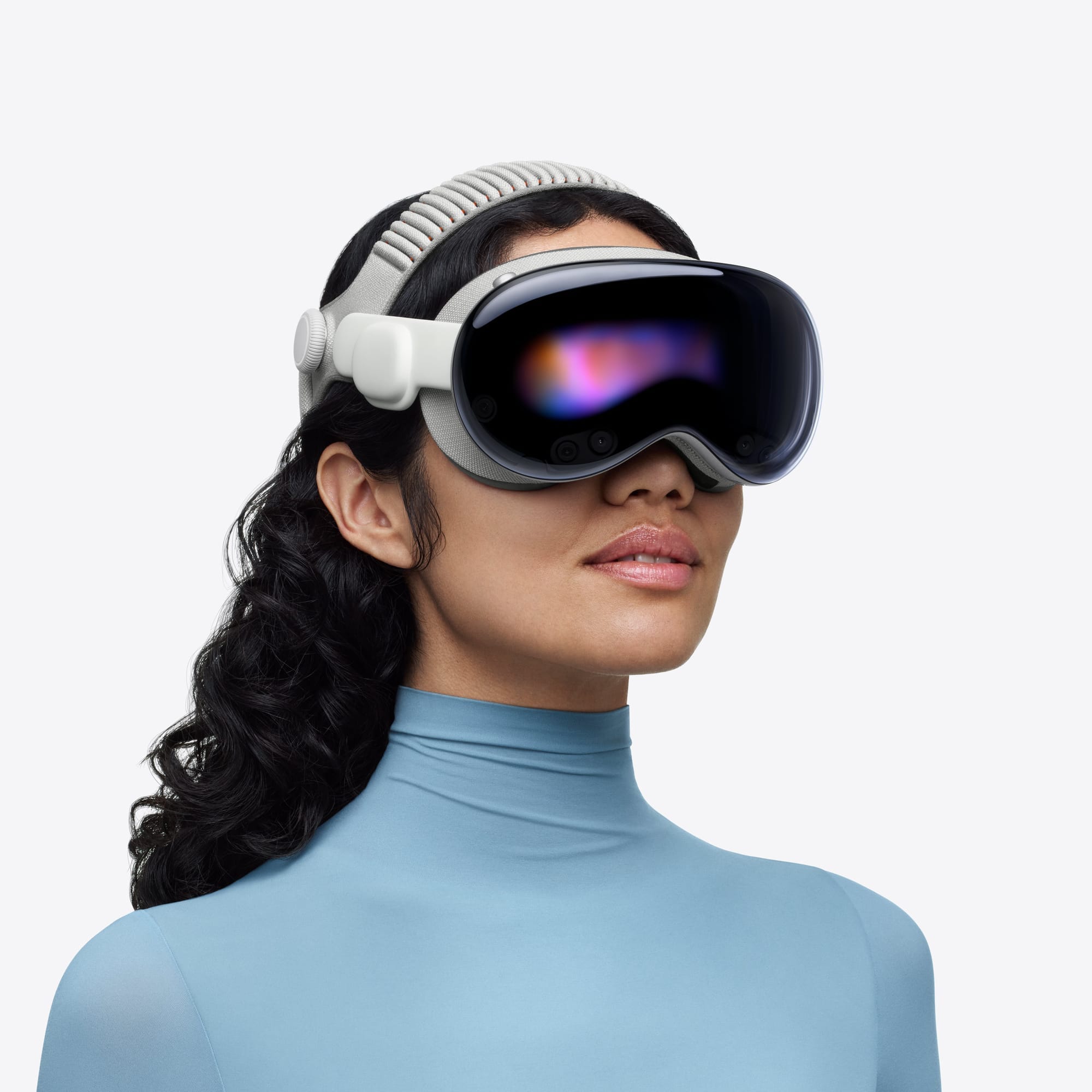
Apple Vision Pro ships with a Light Seal that magnetically snaps onto the aluminum frame and presses gently against your face to block ambient light. Get the wrong size, and the headset leaks light around your cheeks, pushes too hard on your forehead, or sits at an angle that makes the display look blurry. I think this is the single most underrated factor in whether someone keeps their Vision Pro or sends it back within two weeks.
Here is the part Apple does not emphasize enough: there are 14 different Light Seal sizes and four Light Seal Cushion thicknesses. The combination that ships in your box came from a Face ID scan, but that scan is not perfect. Facial hair, the angle you held your phone, even whether you were smiling slightly can throw the recommendation off. And once the wrong Light Seal is on the headset, every session feels subtly wrong without you being able to pinpoint why.
So how do you actually figure out which Light Seal fits your face? And what do you do when the one Apple sent is not it? I have some thoughts.
 Ad
AdWhat the Light Seal Actually Does (and Why It Matters More Than You Think)
The Apple Vision Pro Light Seal is a soft textile shell made from polyester and nylon yarn with a thermoplastic elastomer core. It magnetically attaches to the headset frame and wraps around your eyes, nose bridge, and cheekbones. Its job is simple: block every stray photon of room light so the only thing you see is the display.
When the seal works, the immersion is startling. You forget the headset is there. When it does not work, you get light bleeding in from below your nose or along the sides, and that shimmer of your living room lamp ruins the spatial computing illusion completely.
But light blocking is only half of it. The Light Seal also determines how close your eyes sit relative to the displays. Too close and your eyelashes brush the lenses, which is distracting and genuinely uncomfortable. Too far and the display loses sharpness at the edges. Apple addresses the distance problem with the Light Seal Cushion, a foam pad that magnetically attaches to the Light Seal itself and comes in two thicknesses.
Light Seal vs. Light Seal Cushion: Two Parts, Two Jobs
I want to clear this up because Apple buries the distinction. The Light Seal and the Light Seal Cushion are separate components, and confusing them leads people to order the wrong replacement.
The Light Seal and Light Seal Cushion serve different purposes. Here is how they compare at a glance.
| Attribute | Light Seal | Light Seal Cushion |
|---|---|---|
| What It Does | Conforms to face shape, blocks ambient light | Controls eye-to-display distance |
| Available Sizes | 14 (e.g., 11N, 21W, 35W) | 4 (N, N+, W, W+) |
| Replacement Cost | $199 | $29 |
| How It Attaches | Magnets to the headset frame | Magnets to the Light Seal |
The Light Seal determines your overall face fit. The sizing code is a two-character string like 21W or 33N. The first digit relates to the tilt of your face, whether your forehead or cheekbones protrude more. The second digit controls depth, how far from the display you sit. The letter (N for narrow, W for wide) determines the slope angle. Apple has 14 Light Seal configurations, which means there is a meaningfully different fit for a wide range of face shapes.
The Cushion is the foam pad you likely noticed peeling off. It comes in four options: N, N+, W, and W+. The plus versions are thicker, pushing your eyes slightly farther from the lenses. Every Vision Pro box ships with two Cushion sizes so you can compare. If your eyelashes touch the glass, swap to the thicker pad. If the display seems soft around the periphery, try the thinner one.
How Apple Determines Your Light Seal Size (and Where the Scan Falls Short)
When you order a Vision Pro, the Apple Store app runs a Face ID scan using the TrueDepth camera on your iPhone or iPad. You position your head in a frame and slowly turn in four directions while the depth sensor maps your bone structure. Apple’s algorithm then recommends a Light Seal size and a head band size.
The scan is clever, but it has blind spots. I have read reports from people whose recommendations changed when they shaved, or when they ran the scan wearing contacts instead of glasses. The TrueDepth camera reads surface geometry, and anything sitting on top of your skin can shift the result. If you ordered your Vision Pro online and the fit felt off from day one, this might be why.
The better option is visiting an Apple Store for an in-person fitting. The specialists carry demo units with multiple Light Seal sizes, and you can try two or three back-to-back. Feeling the difference between a 21W and a 23N on your actual face is worth more than any algorithm. Apple also lets you request a size exchange through Apple Support if the initial scan missed the mark.
 Ad
AdSwapping the Light Seal Takes Thirty Seconds
This is one of Apple’s better design decisions with the Vision Pro. The entire Light Seal assembly pulls straight off the headset frame with a gentle tug. No screws, no latches, no tools. The magnets hold it firmly enough for normal use but release cleanly when you pull.
To attach a new one, line up the seal with the frame, cushion side facing outward, and let the magnets click it into place. That is genuinely it. The Cushion pops off the same way, a straight pull, and snaps back on magnetically.
One friction point worth mentioning: the magnetic connection is not what I would call robust. If you tilt the headset forward too aggressively while putting it on, the Light Seal can slip off and fall to the floor. It will not break, but it is the kind of small annoyance that feels wrong on a device that costs $3,499.
Cleaning Your Light Seal Without Wrecking It
The Light Seal sits against your face for hours. It absorbs sweat, skin oil, and whatever else your skin is producing. If you use your Vision Pro regularly, that pad is going to start looking and smelling less than fresh within a couple of weeks. Apple’s official cleaning guide is specific about what to use and what to avoid, and I would not deviate from it.
For the Light Seal itself: detach it, wet a soft lint-free cloth with warm water and a drop of unscented, dye-free dish soap, and gently rub the surface for about two minutes. Rinse with a clean damp cloth. Let it air dry completely before reattaching. Do not use it wet.
For the Cushion: mix five teaspoons of fragrance-free dish soap into two cups of warm water. Submerge the Cushion, gently press it for two minutes, then rinse under running water for thirty seconds while squeezing out the soap. Air dry. The Cushion is foam, so it takes longer to dry than you expect.
What not to use: disinfectant wipes, isopropyl alcohol, Windex, laundry detergent, or any scented cleaner. The textile and foam materials are sensitive to harsh chemicals, and using them voids any argument you might have with AppleCare.
Wearing Glasses? You Cannot. Get ZEISS Optical Inserts Instead
I should be blunt about this: regular glasses do not fit inside the Vision Pro. The Light Seal wraps too closely to your face for frames to sit between your eyes and the lenses. Apple partnered with ZEISS to make Optical Inserts, lightweight magnetic lenses that click into the headset where your glasses would otherwise go.
ZEISS Optical Inserts for readers cost $99. Prescription inserts run $149 and require a current, unexpired prescription. They support most corrections including progressive and bifocal, but not prism correction. Upload your prescription through Apple’s website or the Apple Store app, and the lenses ship custom-made.
One detail people miss: the ZEISS inserts slightly change the effective eye-to-display distance, which can affect your Light Seal Cushion choice. If you previously used the N Cushion without inserts, you might need N+ once the ZEISS lenses are in place. Worth testing both after the inserts arrive.
Every Comfort Complaint and What Actually Fixes It
Comfort is the top reason people return the Vision Pro. Not the price, not the app library. Comfort. And most of the comfort problems trace directly back to the Light Seal fit. If you have been exploring what Vision Pro can do but find yourself taking it off after forty minutes, here is what to check.
- Light leaking in from below: Try a narrower Light Seal (switch from W to N). If the gap is specifically at the nose, this is normal to a degree. The nose bridge will always have a small opening. A thinner Cushion can also pull the seal closer to your face.
- Pressure on the forehead: Your Light Seal’s first digit might be wrong. If you are currently on a 1X code, try a 2X or 3X, which redistributes weight toward the cheekbones.
- Eyelashes brushing the lenses: Swap to the thicker Cushion (N+ or W+). This creates more clearance between your eyes and the glass.
- Blurry edges on the display: Your eyes might be too far from the lenses. Try the thinner Cushion. Also run Settings, then Eyes and Hands, then Realign Displays to recalibrate.
- Headaches after extended sessions: Tighten the head band with the Fit Dial. The headset should sit securely without the Light Seal bearing all the weight. If that does not help, the Light Seal size itself may be compressing the wrong pressure points. Visit an Apple Store.
The M5 Apple Vision Pro introduced a Dual Knit Band that redistributes weight more evenly than the original Solo Knit Band and Dual Loop Band. If you bought your headset before October 2025, upgrading the band alongside the Light Seal fit can be a significant improvement. Apple sells the Dual Knit Band separately.
A $199 Light Seal Replacement Changed Everything
I will be honest: $199 for a piece of textile that magnetically sticks to a headset feels aggressive. A new Light Seal Cushion at $29 is more palatable. But if your original Light Seal is genuinely the wrong size, no amount of Cushion swapping or band tightening will fix the underlying problem.
Think about it this way. You spent $3,499 on the headset. If a $199 accessory makes the difference between using it daily and letting it collect dust on a shelf, the math works out.
If you are on the fence, try the Apple Store fitting first. It costs nothing. Walk in, tell them the headset is not comfortable, and they will test different sizes on you. You might discover your scan nailed it and the problem is the band tension. Or you might discover you have been wearing a 21W when you needed a 23N this whole time. Either way, you leave with an answer.
Quick-Action Checklist: Diagnosing Your Light Seal Fit
- Remove the Light Seal from the headset. Check the size code printed inside. Note it.
- Remove the Cushion from the Light Seal. Check whether it is N, N+, W, or W+.
- Put the headset on with your current setup. Note where discomfort or light leakage occurs.
- Swap to the other Cushion that came in the box. Wear the headset for five minutes and compare.
- If neither Cushion resolves the issue, book a free fitting at an Apple Store or request a Light Seal exchange through Apple Support.
- For glasses wearers: order ZEISS Optical Inserts, then re-test Cushion thickness once they arrive.
- Clean both the Light Seal and Cushion every two weeks with warm water and fragrance-free dish soap. Air dry completely before reattaching.
The Vision Pro is built to replace your monitors and reshape how you work. But none of that matters if the thing hurts to wear. Get the Light Seal right, and the headset stops being a gadget you demo for friends and starts being something you actually reach for.

Related Posts
Galaxy XR vs Apple Vision Pro: An Apple Owner's Honest Verdict
Feb 27, 2026
Apple Vision Pro Two Years In: What Changed, What Didn't, and What You Should Set Up Right Now
Feb 22, 2026
Replace Two Monitors With Vision Pro Mac Virtual Display
Feb 05, 2026