

🎧 Listen to this article
Prefer to listen? An audio version of this article is available for accessibility and convenience.
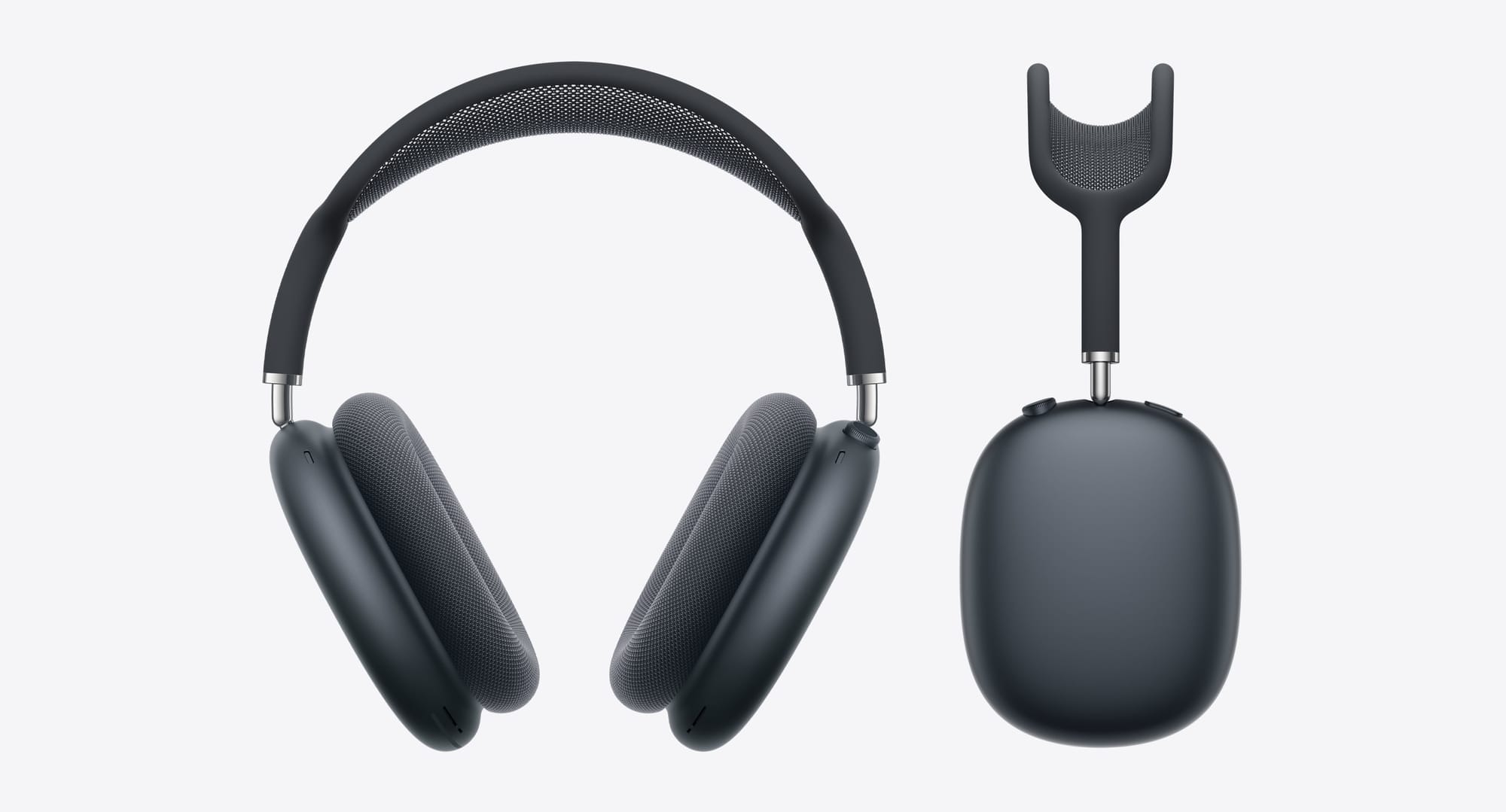
Your AirPods Max need a gentle hand and the right supplies. To clean the ear cushions, pull them off — they detach magnetically — and mix one teaspoon of liquid laundry detergent into one cup of water. Dip a lint-free cloth into that solution, wring it out, and rub each cushion gently for about a minute. Wipe them down again with a cloth dampened in fresh water only, then lay them flat to dry for at least a full day before snapping them back on. For the exterior aluminum and stainless steel, you can use 70 percent isopropyl alcohol wipes or Clorox Disinfecting Wipes. For the knit mesh canopy on the headband, use that same detergent-and-water mixture and a soft cloth. Never submerge any part of AirPods Max in water or cleaning solution. They are not waterproof. They are not water-resistant. Apple explicitly says no bleach, no hydrogen peroxide, and no running them under a faucet.
Simple enough, right? But here is the part Apple does not put in bold on their official cleaning guide: those anodized aluminum ear cups conduct temperature. When the cold metal meets the warmth radiating off the sides of your head during a long listening session, condensation forms inside the cups and soaks into the cushion foam. You might pull off your AirPods Max after two hours and notice the mesh textile feels damp against your fingertips. That is not sweat — or at least, it is not only sweat. It is physics doing exactly what physics does when warm air hits a cold surface. And if you immediately tuck them into that magnetically sealed Smart Case, you are trapping that moisture in a dark, unventilated pocket where it cannot evaporate.
So cleaning your AirPods Max is only half the job. The other half is knowing how to store and maintain them so grime, moisture, and odor do not build up faster than you can deal with them.
 Ad
AdThose Cushions Come Off for a Reason
Apple designed the ear cushions on AirPods Max to detach. One firm pull and each cushion pops free from its magnetic mount. This was partly an engineering decision for modularity and partly, I suspect, an admission that any surface pressed against human skin for hours at a time is going to need regular washing. At $69 per replacement pair from Apple, keeping the originals in good shape is worth the ten minutes of effort.
Here is where most people go wrong. They grab a wet wipe, swipe the outside of the cushion while it is still attached, and call it clean. That does almost nothing. The interior mesh — the part that actually touches your ear and absorbs oil, sweat, and dead skin — is where the real buildup happens. You cannot clean it properly while it is mounted to the cup because you cannot apply even pressure, you risk getting moisture into the driver housing, and you simply cannot see what you are doing.
Pull the cushions off. Every time.
Once they are off, mix that one teaspoon of liquid laundry detergent into one cup of water. Use a lint-free cloth, not a paper towel that will shed fibers into the mesh weave. Dip, wring until barely damp, and rub the cushion surface in small circles for a full minute per cushion. Then take a separate cloth dampened with plain water and wipe away the soap residue. Lay both cushions flat on a dry towel and leave them alone for at least twenty-four hours. Do you actually have to wait that long? You do. The acoustically engineered memory foam inside absorbs moisture, and reattaching cushions before they are fully dry is how you end up with that musty headphone smell that no amount of surface wiping will fix.
Do Not Forget the Headband Exists
I am going to be honest — I cleaned my AirPods Max cushions regularly for months before I realized the headband mesh canopy was equally disgusting. It sits on top of your head. It absorbs hair product, natural oils, and whatever your scalp decides to produce on a given Tuesday. The canopy is made from a breathable knit mesh composed of over ninety percent post-consumer recycled polyester, and while that is great for the environment, polyester knit is also great at trapping sebum.
The cleaning method is the same detergent-and-water solution you used on the cushions, with one critical difference: Apple says to hold the headband upside down while cleaning the canopy. Why? Because you want gravity pulling moisture away from the headband attachment points and the stainless steel frame, not into them. Rub gently with a damp cloth for one minute, then wipe with a fresh-water-dampened cloth and let it air dry completely.
Here is a friction point worth mentioning. If you want to remove the headband entirely for a more thorough cleaning, you need a SIM ejector tool or a straightened paperclip. There is a tiny pinhole on each arm of the headband frame — poke it, and the headband slides off. Apple does not exactly advertise this in big letters, and the first time you try it you will probably feel like you are breaking something. You are not. But the fact that you need a separate tool to disassemble a part that sits directly on your scalp and absorbs grime daily strikes me as an unnecessary barrier to basic hygiene maintenance. A tool-free release mechanism would have been the right call here.
 Ad
AdThe Condensation Problem Nobody Warned You About
Have you ever taken off your AirPods Max after a long flight and noticed actual moisture on the inside of the ear cups? You are not imagining it. At 13.6 ounces, AirPods Max are substantially built headphones with solid anodized aluminum cups that retain cold ambient temperature. When the warmth from your skin meets that cold aluminum, water vapor in the trapped air condenses. Extended wear makes it worse. Cold environments make it worse. Working out with them on — which, given the weight, I genuinely do not recommend — makes it dramatically worse.
This is not a defect. It is a material consequence.
Apple’s solution is implicit rather than stated: the cushions are magnetically removable so you can pull them off and let everything breathe. But you have to actually do it. After every session longer than an hour, pop the cushions off and set the headphones on a flat surface in a ventilated area for at least fifteen to twenty minutes before storing them. Do not drop them straight into the Smart Case. That case was designed to trigger the ultra-low-power state and protect the headphones during transport, but its sealed magnetic closure makes it a terrible place to store damp hardware.
Well, what if you already have a moisture problem? What if your cushions smell a little off or you have noticed the audio sounding slightly muffled on one side? Pull the cushions, do the full detergent wash described above, and dry them for a full day. If the smell persists after a proper cleaning, the foam may have absorbed enough moisture and oil over time that it is beyond saving, and that is when the $69 replacement cushions stop sounding expensive and start sounding reasonable. Apple sells them in multiple colors, by the way, so you can swap your look while you are at it.
What to Use and What to Never Touch Them With
The exterior surfaces of AirPods Max — the aluminum ear cups, the stainless steel headband frame, the Digital Crown, the noise control button — can handle seventy percent isopropyl alcohol wipes or Clorox Disinfecting Wipes. Go ahead. Those hard, nonporous surfaces will be fine.
But do not let those wipes touch the knit mesh canopy or the ear cushion textile. Ever. The alcohol and chemicals in disinfecting wipes can degrade the mesh fibers, strip the textile coating, and damage the acoustic properties of the cushion material. Apple is explicit about this, and I have seen firsthand what a well-meaning alcohol wipe does to memory foam mesh — it gets stiff, loses its softness, and starts to pill within weeks.
Also on the banned list: bleach, hydrogen peroxide, aerosol sprays, solvents, and ammonia. Basically, if it would be aggressive on a delicate fabric, keep it away from your AirPods Max. The detergent-and-water method is gentle enough to preserve the materials and effective enough to cut through skin oils. Trust the boring solution. It works.
One more thing worth knowing: this cleaning process applies identically to both the original Lightning-connected AirPods Max and the 2024 USB-C model. Same Apple H1 chip, same design language, same materials, same care requirements. If you have upgraded to the newer model, nothing changes about maintenance.
Get More Out of Them While They Are Clean
Once your AirPods Max are fresh and dry and sounding their best, it is worth spending five minutes in your settings to make sure you are actually hearing everything these headphones can deliver. There are dozens of hidden AirPods settings on your iPhone that most people never touch — custom audio profiles, press-and-hold behavior, automatic ear detection sensitivity — and adjusting them can make a noticeable difference in daily use.
And if you are running macOS Tahoe or iOS 26, you might want to look into the hidden audio features that Apple quietly added for AirPods Max. Clean hardware paired with properly configured software is how you get the experience Apple priced these headphones for. Otherwise, you are just wearing expensive earmuffs.
Quick-Action Checklist
- Pull off both ear cushions magnetically before any cleaning — never clean them while attached.
- Mix one teaspoon liquid laundry detergent into one cup of water for cushions and canopy.
- Rub each cushion with a damp lint-free cloth for one minute using small circles.
- Wipe cushions again with a fresh-water-dampened cloth to remove soap residue.
- Lay cushions flat to air dry for a minimum of twenty-four hours before reattaching.
- Hold the headband upside down while cleaning the mesh canopy to keep moisture out of the frame.
- Use a SIM ejector tool or paperclip in the pinhole to fully remove the headband for deep cleaning.
- Wipe aluminum cups and stainless steel frame with 70 percent isopropyl alcohol wipes or Clorox Disinfecting Wipes.
- Never use alcohol wipes, bleach, or hydrogen peroxide on the mesh canopy or cushion textile.
- Never submerge any part of AirPods Max in water or cleaning solution.
- After wearing, remove cushions and air out in a ventilated space for 15 to 20 minutes before casing.
- Do not store AirPods Max in the Smart Case while ear cups or cushions are still damp.
- Replace cushions ($69 per pair from Apple) if odor persists after a full detergent wash and dry cycle.

Related Posts
Your AirPods Have Dozens of Hidden Settings on Your iPhone — Here Is Every One
Mar 03, 2026
Your AirPods Have Three Spatial Audio Modes You Probably Never Switched
Mar 03, 2026
AirPods Pro 3 vs Galaxy Buds 4 Pro: Which Earbuds Sound Better for Your Money
Mar 02, 2026