

🎧 Listen to this article
Prefer to listen? An audio version of this article is available for accessibility and convenience.
That notification caught you off guard. You picked up your iPhone, maybe first thing in the morning, and there it was — “Background Security Improvements Applied.” No explanation. No details. Just a vague assurance that something happened to your phone while you slept. The short answer is this: Apple patched a WebKit vulnerability that let malicious websites bypass one of the most fundamental security barriers in your browser. The longer answer is more interesting, and honestly, a little unsettling when you think about how quietly it all happened.
On March 17, 2026, Apple pushed a Background Security Improvements patch to iPhones running iOS 26.3.1. The patch addressed CVE-2026-20643, a flaw in WebKit’s Navigation API that allowed crafted web content to slip past the Same Origin Policy. That policy is the thing stopping a sketchy website from reaching into your bank’s open tab and reading your data. Security researcher Thomas Espach discovered the bug, tracked under WebKit Bugzilla #306050, and Apple’s fix tightened input validation to block cross-site navigation exploits. Apple published the CVE details on their support documentation page, though you’d have to go looking for it.
 Ad
AdWhat the Notification Actually Means
Background Security Improvements — BSI, if you want to sound like you work in Cupertino — is Apple’s replacement for Rapid Security Response, the system they used previously to ship urgent patches between major iOS updates. The concept is the same. Apple identifies a critical vulnerability, builds a targeted fix, and pushes it to your device without making you sit through a full software update. The difference is that BSI is quieter and more surgical. It patches specific components like Safari, WebKit, or system libraries rather than touching the entire operating system. Your iPhone restarts in under a minute instead of the five to ten minutes a standard update demands.
I think this is genuinely great.
The old Rapid Security Response system worked, but it felt clunky. You’d get a notification, have to approve the install, wait for a restart, and then hope nothing broke. BSI does the heavy lifting in the background. You wake up, see the notification, and the fix is already in place. For a vulnerability like CVE-2026-20643 — something that could be actively exploited just by visiting the wrong website — speed matters enormously. The faster that patch lands on your phone, the smaller the window where you’re exposed. Apple doesn’t always get security communication right, but the engineering behind BSI is solid work.
Here’s what bugs me, though. That notification is terrible. “Background Security Improvements Applied” tells you absolutely nothing. It doesn’t say what was fixed, why it mattered, or even which component changed. I had to dig through Apple’s support page and cross-reference CVE databases to piece together what happened on March 17. Most people will see that notification, shrug, and move on. And honestly, maybe that’s fine for a lot of folks. But for anyone who actually cares about what’s running on their device — and you should care — Apple could do better. A single line like “Fixed a WebKit browser vulnerability” would go a long way.
 Ad
AdHow BSI Works Under the Hood
The mechanics are straightforward once you understand what Apple is doing. BSI patches are supported on iOS 26.1 and later, iPadOS 26.1 and later, and macOS 26.1 and later. When Apple identifies a vulnerability serious enough to warrant an out-of-cycle fix, they build a patch targeting just the affected component. That patch downloads in the background over Wi-Fi, installs without interrupting whatever you’re doing, and applies itself during a brief restart that most people sleep through. The whole process is designed to be invisible.
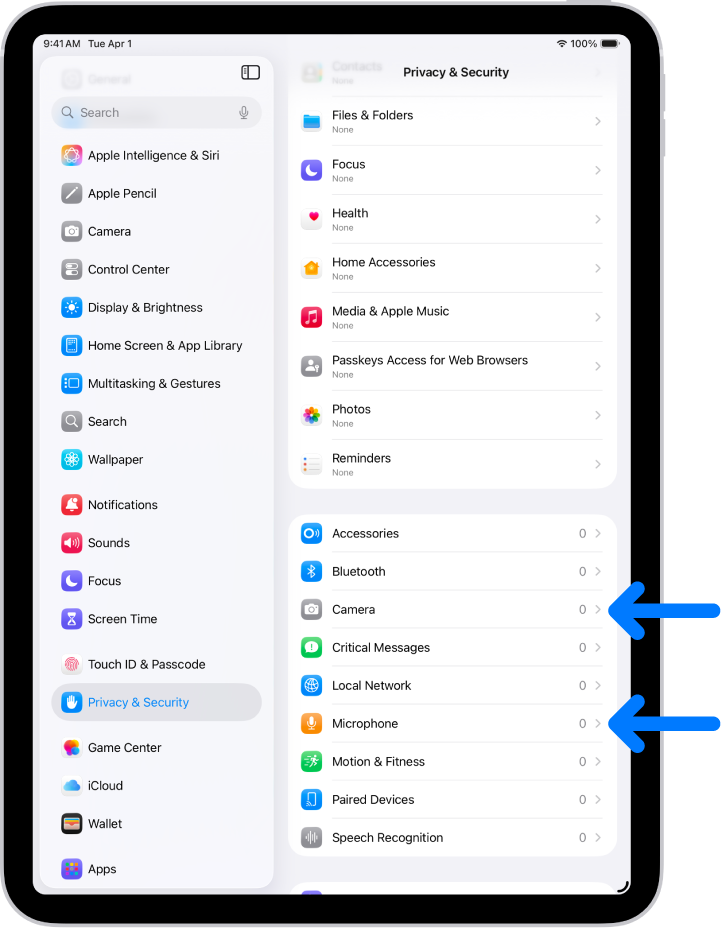
You can check whether BSI is enabled on your iPhone by going to Settings, then Privacy & Security, then Background Security Improvements. There’s an “Automatically Install” toggle in there. It should be on by default, but it’s worth confirming. If you’ve ever turned it off — maybe during the Rapid Security Response days when a patch caused compatibility issues — it might still be disabled.
That brings up a real edge case worth knowing about. If a BSI patch causes problems — say it breaks a specific app or creates a compatibility conflict — Apple can temporarily remove it from your device and re-apply a corrected version in a subsequent update. This is a safety net, and it’s smart engineering. But it also means there could be a window where a fix you thought was in place has been quietly rolled back. Apple doesn’t make this obvious. You won’t get a notification saying “Hey, we pulled that security patch back.” You just have to trust the system. For most people, that trust is reasonable. But the lack of transparency is a friction point that I wish Apple would address.
Why This Specific Vulnerability Matters
The Same Origin Policy is one of those things you never think about until it fails. It’s a foundational browser safeguard — arguably the most important one — that prevents scripts running on one website from accessing data on another. Every time you have your email open in one tab and some random site open in another, the Same Origin Policy is the wall between them. CVE-2026-20643 punched a hole in that wall through WebKit’s Navigation API, which handles how your browser moves between pages and manages browsing history.
What makes this particularly concerning is the attack vector. You didn’t have to download anything. You didn’t have to approve a permission. You just had to visit a webpage with malicious content. That’s it. The crafted web content could exploit the Navigation API to bypass origin checks and potentially access data from other sites loaded in your browser. Thomas Espach’s discovery and Apple’s quick response likely prevented this from becoming a widespread problem, but the vulnerability itself is the kind of thing that keeps security researchers up at night.
If you updated to iOS 26.3.1 when it dropped, you were already in a better position than someone sitting on an older version. BSI then layered the specific WebKit fix on top of that. The two work together — the OS update handles broader patches, and BSI handles the surgical strikes.
The Bigger Security Picture on Your iPhone
Apple has been steadily tightening the security model across iOS 26, and BSI is just one piece of that. If you haven’t gone through your iPhone privacy settings after the iOS 26.3 update, that’s worth doing separately — BSI handles vulnerabilities, but your privacy configuration handles what you’re willingly sharing with apps and services. They’re different problems that need different attention.
There’s also something interesting coming down the road. Reports from 9to5Mac indicate that iOS 26.4, expected to arrive shortly, will auto-enable a strict security feature across all iPhones. I don’t know the full scope of that yet, but it lines up with Apple’s recent pattern of making security defaults more aggressive. If you want to stay ahead of it, the iOS 26.4 settings guide covers seven changes worth making once that update lands.
Should Apple tell you more about what BSI patches actually fix? Absolutely. I think the current notification is borderline disrespectful to anyone paying attention. But should you leave BSI enabled and let Apple push these fixes automatically? Also absolutely. The alternative — waiting for a full OS update to patch a vulnerability that can be exploited by visiting a webpage — is worse in every measurable way. The system works. The communication around it just needs to catch up.
One more thing. Go check that toggle. Settings, Privacy and Security, Background Security Improvements. Make sure “Automatically Install” is turned on. It takes ten seconds, and it’s the difference between your iPhone being patched while you sleep and your iPhone sitting exposed until you manually update. Ten seconds.

Related Posts
iOS 26.4.1 Fixes the iCloud Bug That Broke Your Apps
Apr 09, 2026
iOS 26.4 Drains Your iPhone Battery. Here’s What Fixes It
Apr 09, 2026
Your iPhone Finally Lets You Create Custom Ringtones in iOS 26
Apr 08, 2026