
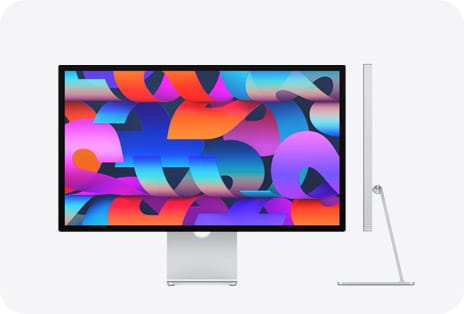

The iMac M4 is a full desktop workstation disguised as a monitor. It packs an Apple M4 chip, a 24-inch 4.5K Retina display with 11.3 million pixels, a six-speaker sound system with Spatial Audio, a 12MP Center Stage camera, and Thunderbolt 4 connectivity into a slab of aluminum thinner than most picture frames. Every configuration supports Apple Intelligence out of the box, starting at $1,299.
But most buyers grab the base model, plug it in, and never look at the configuration decisions that separate a good iMac experience from a genuinely great one. The gap between the $1,299 two-port model and the $1,499 four-port model is not just about two extra USB-C ports. It is about external display support, a better keyboard, Gigabit Ethernet, and access to the nano-texture display option that changes how the screen handles light. Those distinctions matter far more than the spec sheets suggest.
I want to walk through every decision point so you know exactly what you are getting and what you are leaving on the table.
 Ad
Ad
The Apple M4 Chip Earns Its Seat at Every Price Point
Every iMac M4 runs on Apple’s 3-nanometer M4 chip with a 16-core Neural Engine capable of 38 trillion operations per second. That Neural Engine number sounds abstract until you realize it powers every Apple Intelligence feature: Writing Tools that rewrite your emails, system-wide text summarization, and on-device image generation through Image Playground. None of that requires an internet connection. It all runs locally on the chip sitting behind the display.
The base model gives you an 8-core CPU and 8-core GPU. The four-port models bump that to 10 cores each. In benchmarks, the difference is roughly 7 percent in multi-core performance. In real use, the gap shows up when you are exporting a Final Cut Pro timeline while running a dozen Safari tabs and a Figma project. The base model handles that workload. The 10-core model handles it without the fans ever spinning up.
Here is what surprised me about the M4 in this form factor: the iMac is completely silent. No fans audible at idle, no fans audible under moderate load. Apple rates the M4 iMac at up to 1.7 times faster than the M1 iMac for daily tasks and 2.1 times faster for demanding workflows like photo editing. Those numbers check out against third-party Geekbench 6 results, where the M4 posts single-core scores around 3,781 and multi-core around 14,858.
That 4.5K Display Deserves a Closer Look
The 24-inch Retina display runs at 4480 by 2520 resolution, which works out to 218 pixels per inch. It supports the P3 wide color gamut with over one billion colors, 500 nits of brightness, and True Tone that adjusts white balance to match your room lighting. For creative work, this display is genuinely good. Color accuracy holds up against standalone monitors that cost $800 on their own.
The nano-texture option is the real story here, and Apple only offers it on the four-port models for an additional $200. Nano-texture etches the glass at a microscopic level to scatter ambient light. The result is a screen that looks matte from a distance but retains the contrast and color depth of glossy glass up close. If your desk faces a window or sits under overhead lighting, this option eliminates glare without the washed-out look of a traditional matte panel. I think Apple should offer it on every model. Restricting it to the higher tier is frustrating.
One thing that catches people off guard: the iMac M4 does not have ProMotion. The display runs at a fixed 60Hz. Coming from an iPhone 17 Pro or iPad Pro with 120Hz scrolling, you will notice the difference for about a week, and then your brain adjusts. It is a strange omission on a $1,299 desktop in 2026, but it does not ruin the experience.
Two Ports or Four: Why This Decision Matters More Than RAM
The base iMac M4 has two Thunderbolt 4 ports on the back. The four-port models have four. This sounds like a minor convenience difference. It is not.
With two ports, one goes to your backup drive and the other goes to whatever peripheral you need most. Need a wired keyboard, an external SSD, and a second display? You are already shopping for a Thunderbolt dock. With four ports, you connect an external display, a backup drive, an audio interface, and still have a port free for an SD card reader or an iPhone cable. The four-port model also includes Gigabit Ethernet built into the power adapter at no extra charge. The two-port model charges $30 for the same feature.
External display support is the bigger differentiator. The base model drives one external display at up to 6K resolution at 60Hz. The four-port models drive two external displays at 6K each, or one display at 8K 60Hz. If you are building a multi-monitor workstation around the iMac, the base model caps you at two total screens. The four-port model gives you three.
Apple’s iMac technical specifications break down the full port comparison, and I would recommend reading them before ordering.
This table compares the two main iMac M4 tiers across key configuration differences that affect daily use.
| Feature | 2-Port Base ($1,299) | 4-Port ($1,499+) |
|---|---|---|
| CPU / GPU | 8-core / 8-core | 10-core / 10-core |
| Thunderbolt 4 Ports | 2 | 4 |
| External Displays | 1 at 6K 60Hz | 2 at 6K or 1 at 8K 60Hz |
| Gigabit Ethernet | Optional (+$30) | Included |
| Max Unified Memory | 24GB | 32GB |
| Nano-Texture Display | Not available | +$200 option |
Center Stage and the Six-Speaker System Nobody Talks About
The iMac M4 is the first iMac with a 12MP Center Stage camera. Center Stage uses the wide-angle lens and the M4’s image signal processor to track your face and keep you centered in the frame during video calls, even when you lean back, stand up, or pull someone else into the shot. It also supports Desk View, which splits the feed into a face-level view and an overhead shot of your desk simultaneously. For anyone who does video calls for work, the camera alone justifies choosing the iMac over a Mac Mini with a separate monitor.
The speaker system is a six-speaker array with two pairs of force-cancelling woofers and two tweeters. Force-cancelling means each woofer pair vibrates in opposite directions to cancel out chassis vibration, so the aluminum body stays still while the bass hits. The system supports Spatial Audio with Dolby Atmos, and the three-mic array uses directional beamforming for voice calls. I have sat through two-hour video calls on the iMac without reaching for headphones. The mic picks up my voice clearly from three feet away, and the speakers fill a home office without any tininess.
If you have already explored macOS Tahoe terminal commands that replace third-party apps, the iMac is the machine where those workflows feel most natural. The large display gives terminal windows room to breathe alongside your main workspace.
Join The Inner Circle For Serious Apple Users
Exclusive Apple tips. Free to join.
Apple Intelligence on a Desktop Changes the Workflow
Apple Intelligence runs on every M4 iMac configuration. No minimum RAM requirement, no special model needed. The 16-core Neural Engine handles Writing Tools, Smart Replies, notification summaries, Genmoji creation, and Image Playground entirely on-device. The performance is noticeably faster than running the same features on an iPhone because the M4 has thermal headroom that a phone does not. Summarizing a long email thread takes about a second. Rewriting a paragraph in a different tone is nearly instant.
The desktop context makes Apple Intelligence more useful than it is on mobile. You are more likely to be writing long documents, processing research, and managing complex email threads at your desk. Writing Tools in particular feel like they were designed for a keyboard-and-display workflow rather than a phone screen. If you want to build custom AI automations, Apple Intelligence shortcuts on Mac open up possibilities that go well beyond the built-in features.
What I Would Actually Buy (and What I Would Skip)
The $1,299 base model is a solid computer for someone who uses a single display, keeps their peripheral count low, and does not need the nano-texture option. It is a perfectly good machine.
But I would buy the $1,499 four-port model. The extra $200 gets you two additional Thunderbolt 4 ports, the 10-core CPU and GPU, Gigabit Ethernet included, a Magic Keyboard with Touch ID in the box, and access to the nano-texture display upgrade. That is a lot of value for $200. The base model saves money upfront but forces compromises that become annoying six months in.
RAM is where I would be careful. Every M4 iMac starts at 16GB of unified memory, which is double the previous generation’s base. For web browsing, office work, photo editing, and even light video editing, 16GB is enough. Upgrade to 24GB if you regularly run virtual machines, work in Logic Pro with large session files, or keep 40 browser tabs open alongside creative apps. The jump to 32GB is only available on the four-port models and only necessary if your workflow genuinely pushes memory limits.
Skip the storage upgrades from Apple. The 256GB base SSD is tight, but a 2TB external Thunderbolt SSD costs less than Apple’s internal 1TB upgrade and gives you portable storage you can use with other machines. The Mac Mini M4 workstation guide covers the same external storage strategy, and it applies equally to the iMac.
The Stuff That Actually Gets Under My Skin
I love the iMac M4. But it is not perfect. The 60Hz display in 2026 is hard to defend when Apple sells 120Hz panels on iPhones, iPads, and MacBooks. The base model shipping without Touch ID on the keyboard feels like a calculated move to push people toward the four-port model. And the fact that you cannot configure the base model with nano-texture glass at any price is genuinely annoying. These are the kinds of decisions that make sense in a product matrix spreadsheet but feel arbitrary when you are the person spending money.
The power cable on the back uses a magnetic MagSafe-style connector, which is elegant but proprietary. If you lose or damage the cable, it is a $50 replacement from Apple. The stand does not offer height or tilt adjustment beyond a basic tilt range. A VESA mount option exists, but you have to choose it at the time of purchase. You cannot add it later.
All seven colors are available on every model now, which is an improvement over the M3 generation. Green, yellow, orange, pink, purple, blue, and silver. The colors are lighter and brighter than the M3 versions. Every iMac ships with color-matched accessories, and all of them now charge via USB-C. That alone is a small victory.
Apple’s iMac support documentation covers the full setup process if you want to review every detail before unboxing.

Related Posts
Apple Studio Display XDR Has the HDR That Most Mac Monitors Cannot Touch
Mar 06, 2026
Apple's Two $599 Devices Go Head to Head — and One Makes More Sense Than You Think
Mar 05, 2026
Apple’s $599 MacBook Neo vs the MacBook Air M5
Mar 04, 2026