
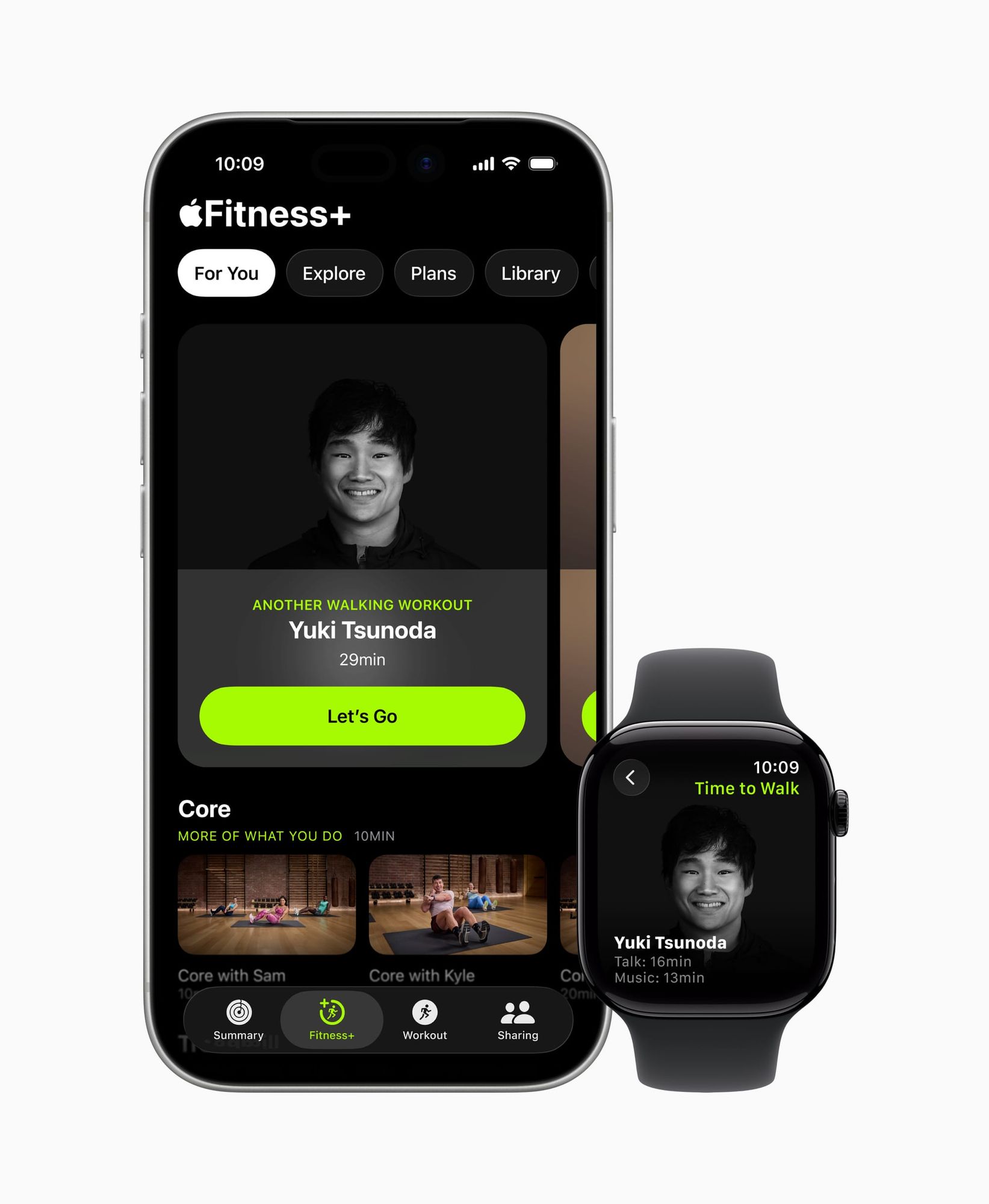

Apple Fitness+ is a guided workout subscription that costs $9.99 per month or $79.99 per year, and it turns an Apple Watch into a live biometric dashboard displayed right on an iPhone, iPad, or Apple TV screen. Heart rate, calories burned, and Activity Ring progress all appear in real time during every class. That real-time data sync is the single feature that separates Fitness+ from every other workout app on the market. But whether the subscription is worth paying for depends entirely on which Apple devices are in the room when the workout starts, and on one specific gap that Apple still has not closed.
What Fitness+ Actually Gives You Beyond the Free Workout App
Every Apple Watch ships with a free Workout app that tracks metrics like heart rate, pace, and calories. That app works fine for self-directed exercise. Fitness+ layers on top of it with over 4,000 guided video classes spanning 12 workout categories: HIIT, Yoga, Strength, Pilates, Dance, Cycling, Treadmill, Rowing, Kickboxing, Meditation, Cooldown, and Core. The trainers are on screen, the music is curated, and your Apple Watch metrics appear alongside the video feed so you can see exactly how hard you are working without glancing at your wrist.
The structured multi-week programs are where Fitness+ pulls ahead of a la carte workout videos. New programs released in 2026 include Make Your Fitness Comeback (four weeks), Build a Yoga Habit (four weeks), Back-to-Back Strength and HIIT (three weeks), and Strength Basics (three weeks). Each program builds progressively, which solves the biggest problem with random workout playlists: no periodization. Random selection leads to either overtraining or stagnation. A structured plan adjusts volume and intensity week over week.
Strava integration also ships with Fitness+, which means every completed workout pushes automatically to a Strava feed. And Apple's Time to Walk and Time to Run audio episodes add a narrative layer to outdoor sessions that no competitor currently matches.
The Complication: Where Fitness+ Falls Short
Here is the friction point that rarely appears in marketing materials. The Fitness+ experience varies dramatically based on screen size. On an iPhone, the workout video is small. Trainers demonstrating a complex yoga flow or a fast HIIT circuit become difficult to follow on a 6.1-inch display placed on the floor three feet away. The Apple Watch metrics overlay also compresses on the smaller screen, making calorie and heart rate numbers harder to read mid-rep. The experience on an iPad or Apple TV is significantly better because the video fills a larger field of view and the metrics overlay remains legible at a distance.
There is also the question of Fitness+ longevity. Bloomberg reported on February 8, 2026 that the future of Apple Fitness+ remains "under review" internally at Apple, with a possible merger into the Health app as part of a combined subscription offering. That does not mean the service is disappearing tomorrow, but it does mean anyone committing to an annual plan should be aware of the strategic uncertainty.
The free three-month trial offer softens the risk considerably. Apple bundles three free months of Fitness+ with the purchase of a new Apple Watch, iPhone, iPad, Apple TV, AirPods Pro 3, or Powerbeats Pro 2. Families benefit further because a single subscription shares with up to five family members. The service is also bundled into Apple One Premier at $37.95 per month, which stacks Apple Music, Apple TV+, Apple Arcade, iCloud+, and Apple News+ alongside Fitness+. According to Apple's developer documentation for Fitness+, the minimum requirements are an iPhone 8 or later running iOS 16.1, or an Apple Watch Series 3 or later running watchOS 7.2. The service currently operates in 48 to 49 countries.
The Real-Time Metrics That Change the Workout
The Apple Watch integration is the core value proposition of Fitness+. When a workout begins, the watch sends heart rate data, calorie burn, and Activity Ring progress to the screen in real time. A Burn Bar compares your effort against other subscribers who have completed the same workout, creating a competitive reference point without requiring a leaderboard or social component. Trainers also call out moments to check metrics during the session, which keeps the data contextual rather than distracting.
Apple Watch health tracking has expanded well beyond workout metrics. Features like hypertension notifications and blood pressure monitoring on Apple Watch feed into a broader health picture that Fitness+ workouts contribute to. The watch is not just counting calories during a HIIT session; it is building a longitudinal health record that the Health app synthesizes over weeks and months.
AirPods Pro 3 add another data point. When paired during a Fitness+ workout, AirPods Pro 3 can display heart rate and calorie data on screen, functioning as a secondary biometric sensor. This is particularly useful during workouts where the wrist sensor on Apple Watch gets disrupted by tight grips on weights or handstand positions. I have found that the AirPods Pro 3 heart rate tracking during workouts fills a genuine gap for strength training sessions where wrist-based optical sensors struggle with consistent readings.
This table compares what Apple Fitness+ subscribers get versus the free Workout app that comes with every Apple Watch. Use it to see exactly where the subscription adds value.
| Feature | Free Workout App | Apple Fitness+ Subscription |
|---|---|---|
| Guided Video Workouts | No | Yes, over 4,000 classes |
| Real-Time Watch Metrics on Screen | Watch display only | iPhone, iPad, or Apple TV screen |
| Structured Multi-Week Programs | No | Yes, including new 2026 programs |
| Family Sharing (Up to 5 Members) | Not applicable | Yes, included |
| Strava Integration | No | Yes |
| Monthly Cost | Free | $9.99/month or $79.99/year |
The Gear That Gets the Most Out of Fitness+
Affiliate disclosure: some links in this article are Amazon Associate links. If you buy through them, Zone of Mac may earn a small commission at no extra cost to you, and we only recommend products that genuinely bring value to your Apple setup.
A workout subscription is only as good as the hardware wearing experience. The stock Apple Watch band that ships in the box works, but it collects sweat under the clasp and can feel slippery during high-intensity floor work. A dedicated sport band with ventilation holes and a pin-and-tuck closure stays locked in place through burpees, planks, and rowing intervals without sliding. The lighter weight also reduces the bouncing that disrupts the optical heart rate sensor during jumping movements, which directly affects the accuracy of the metrics Fitness+ displays on screen. If the watch shifts position mid-workout, the heart rate reading drops out for several seconds and then recalibrates, creating gaps in the Burn Bar data. Choosing the right Apple Watch band transforms how the watch feels during exercise. Pick up the Apple Watch Band Sport Band (46mm) in Black on Amazon https://www.amazon.com/dp/B0DGJ8VFJK?tag=zoneofmac-20
For audio during workouts, the AirPods Pro 3 serve double duty. Active Noise Cancellation blocks gym noise so trainer cues come through clearly, and the in-ear heart rate sensor gives Fitness+ a second biometric feed. The H3 chip maintains a stable Bluetooth connection even when the iPhone is across the room, which matters during floor exercises where the body can partially shield the watch signal. The fit is secure enough for inverted movements, though the silicone tips do accumulate moisture during longer sessions and benefit from a quick wipe between workouts. Setting up Spatial Audio on AirPods also adds an immersive dimension to Fitness+ meditation and cooldown sessions. Grab the Apple AirPods Pro 3 Wireless Earbuds here https://www.amazon.com/dp/B0FQFB8FMG?tag=zoneofmac-20
Join The Inner Circle For Serious Apple Users
Exclusive Apple tips. Free to join.
Check your inbox for a confirmation link.
Something went wrong. Please try again.
Accessibility and Clarity
Apple Fitness+ includes several accessibility features that broaden its reach. Every workout offers Audio Hints, which provide spoken descriptions of trainer movements for users with low vision or blindness. VoiceOver reads on-screen metrics and workout titles. Subtitle support covers all video content in multiple languages. The interface follows a consistent, predictable layout: workout categories on the left, featured content in the center, and metrics in a fixed position during playback. That consistency reduces cognitive load for users with ADHD or processing differences who benefit from stable navigation patterns.
On the physical accessibility side, Fitness+ offers seated workout modifications and a dedicated wheelchair category for Apple Watch users. The Meditation and Mindful Cooldown categories are entirely non-physical. However, the service does not offer sign language interpretation during workouts, and the Audio Hints feature only describes movements at a high level rather than providing the granular positioning detail that a fully blind user would need to perform a complex exercise safely. For users with motor limitations, the small touch targets on iPhone for pausing or skipping workouts can be frustrating. The Apple TV remote or Siri voice commands provide a more accessible control method during active sessions.
Quick-Action Checklist: Set Up Apple Fitness+
- Update your devices: Make sure your iPhone runs iOS 16.1 or later and your Apple Watch runs watchOS 7.2 or later. Open Settings, tap General, then Software Update on each device.
- Open the Fitness app on iPhone: Tap the Fitness+ tab at the bottom of the screen. Sign in with your Apple Account if prompted.
- Activate your trial or subscription: Tap "Try It Free" to start a one-month free trial, or redeem your three-month offer if you recently purchased an eligible Apple device. Annual subscribers select the $79.99/year plan to save over the monthly rate.
- Pair your Apple Watch: Confirm your Apple Watch is paired by opening the Watch app on iPhone. During a Fitness+ workout, the watch automatically begins sending heart rate and calorie data to the screen.
- Set up Family Sharing: Go to Settings, tap your name, then Family Sharing. Add up to five family members who can each access Fitness+ with their own personalized recommendations.
- Connect Strava (optional): Open the Strava app, go to Settings, then Applications, and authorize Apple Health. Completed Fitness+ workouts will sync automatically.
- Choose a multi-week program: Tap Programs in the Fitness+ tab and select a structured plan like Make Your Fitness Comeback or Strength Basics to start with built-in periodization rather than random class selection.

Olivia Kelly
Staff writer at Zone of Mac with over a decade of Apple platform experience. Verifies technical details against Apple's official documentation and security release notes. Guides prioritize actionable settings over speculation.
Related Posts
Build the Custom Apple Watch Face You Actually Want
Apr 06, 2026
Your Apple Watch Band Has a Cleaning Method Most Owners Skip
Apr 02, 2026
Your Apple Watch Has a Sleep System Most Owners Never Touch
Apr 02, 2026