
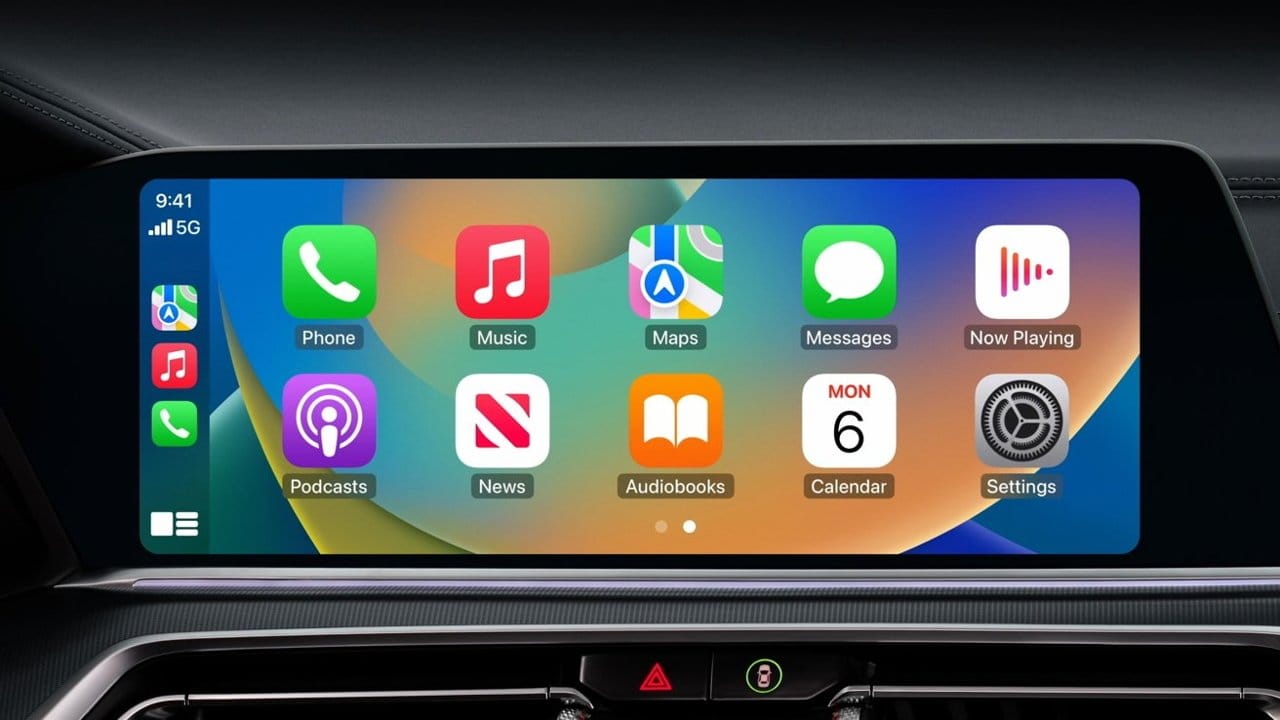

Apple CarPlay in iOS 26.4 is getting three features that fundamentally change what your car screen does: voice-based AI chatbots like ChatGPT, Claude, and Google Gemini; video playback through the Apple TV app when your car is parked; and a refined Liquid Glass dashboard with widget stacks that arrived in iOS 26. The catch is that none of these features turn on automatically, and two of them depend on third-party developers and automakers shipping their own updates before you see anything new on your dashboard.
That gap between "Apple announced it" and "I can actually use it" is the part most CarPlay coverage glosses over. I want to walk through exactly what each feature does, what it requires from your end, and the friction points I have already spotted in the beta that could shape how useful these additions feel on a real commute.
If you have been tracking the broader iOS 26.4 beta, Zone of Mac covered the full roundup of changes worth testing when the first beta dropped. This piece goes deeper on CarPlay specifically, because the dashboard updates deserve their own conversation.
 Ad
AdChatGPT, Claude, and Gemini Walk Into Your Car
The headline feature is a new CarPlay entitlement for voice-based conversational apps. Apple is opening CarPlay to third-party AI assistants for the first time, and the implementation is deliberate. These are not full-blown AI copilots with access to your phone or your vehicle controls. They are voice-only interfaces, sandboxed inside a specialized Voice Control template that Apple designed specifically for the driving context.
In practical terms, you open the ChatGPT app (or Claude, or Gemini) from your CarPlay home screen, ask a question out loud, and get a spoken response. The app shows minimal visual feedback on the car display while the assistant is listening or processing. Apple requires developers to use voice as the primary interaction method and explicitly prohibits displaying text or imagery in response to queries. That last restriction is the one that matters most, because it means you cannot read a long response on your dashboard the way you might glance at a text message.
I also appreciate what Apple chose not to include. There is no wake word support. You cannot say "Hey ChatGPT" while Siri is active and expect the right assistant to respond. You have to manually open the app first, which adds a deliberate step that prevents accidental activation mid-drive. It does, though, mean that switching between Siri and a third-party chatbot requires a tap or two on the CarPlay screen, which is slightly awkward if your phone is mounted out of reach.
The AI apps coexist with Siri rather than replacing it. Siri still handles everything it handled before: navigation, calls, messages, HomeKit commands, and media control. The third-party chatbots occupy a separate lane entirely. Think of them as a specialist you can consult for open-ended questions, brainstorming, or dictation tasks that Siri has never been particularly good at.
One edge case worth flagging: response latency in the beta sits around two to three seconds for initial queries. Subsequent responses in the same conversation are noticeably faster, but that first pause after you ask a question feels longer than it actually is when you are sitting at a red light. The audio framework uses the same ducking behavior as phone calls, so your music drops to near-silence while the assistant speaks. If the response runs long, you are effectively sitting in quiet for ten or fifteen seconds. That is not a dealbreaker, but it is a different interaction rhythm than tapping a text prompt on your phone.
Video on Your Car Screen — With One Big Condition
The second major addition is video playback support for CarPlay. The Apple TV app will be available directly on the CarPlay interface, giving you access to shows, movies, Apple TV+ originals, and even the MLS Season Pass. Any AirPlay-supported streaming app can potentially send video to the car display as well.
The condition: your vehicle must be parked. Apple is not allowing video playback while the car is in motion, and automakers need to implement support for the feature on their end. This is a safety requirement that sits at the car level, not the phone level, which means your iPhone running iOS 26.4 is only half the equation. If your car manufacturer has not shipped a software update that enables parked-mode video on their infotainment system, you will not see the option.
Honestly, this is the right call from Apple. The parked-only restriction eliminates the most obvious safety concern, and it turns the car screen into something genuinely useful during those moments when you are waiting for someone in a parking lot or killing time before an appointment. I spend more time sitting in parked cars than I would like to admit, and having Apple TV+ available on a screen that is already right in front of me is a small quality-of-life win.
In the beta, the video interface routes through a Dynamic Island control that lets you switch playback between the car screen and your iPhone. The beta implementation looks rough around the edges in the simulator, but the underlying architecture is solid. The real question is how quickly automakers move. If the past is any indication, some brands will ship updates within weeks and others will take the better part of a year.
A quick comparison of the three major CarPlay additions in iOS 26.4, including availability, interaction method, and what you need to get started.
| Feature | Interaction | Availability | Requirement |
|---|---|---|---|
| AI Chatbots (ChatGPT, Claude, Gemini) | Voice only | While driving or parked | iOS 26.4 + app update from developer |
| Video Playback (Apple TV app) | Touch on car screen | Parked only | iOS 26.4 + automaker support |
| Liquid Glass Dashboard + Widgets | Touch and glance | While driving or parked | iOS 26 or later |
The Dashboard Foundation That Makes All of This Work
The AI chatbots and video support grab headlines, but the foundation underneath is arguably more important for daily use. iOS 26 introduced a complete visual overhaul of CarPlay with Liquid Glass styling, widget stacks, Live Activities, and a redesigned tab bar. iOS 26.4 refines those elements, but the core dashboard changes shipped earlier and are worth understanding if you have not explored them yet.
Widget stacks sit to the left of the main CarPlay dashboard, and they pull from the same widget library as your iPhone home screen. That means weather, calendar, reminders, music controls, and third-party widgets all show up without needing to open their parent apps. The app does not even need to be a "CarPlay app" in the traditional sense. If it has a widget on your iPhone, it can appear on your CarPlay dashboard.
 Ad
AdLive Activities deserve a specific mention. If you have a timer running, a sports score updating, or a food delivery in progress, the Live Activity appears automatically on your CarPlay dashboard. This is one of those features that sounds minor until you experience it during a drive. Seeing your Uber Eats delivery status update on the car screen while you are five minutes from home is surprisingly practical.
According to Apple's iOS 26 update documentation, the new CarPlay design also introduces compact incoming call notifications that keep your navigation visible, tapback reactions in Messages for quick responses while driving, and pinned conversations at the top of the Messages app. These are smaller touches, but they reflect Apple's broader strategy of making CarPlay interactions faster and less visually demanding.
What You Actually Need to Get These Features
Not every iOS 26.4 CarPlay feature requires the same setup. The AI chatbot support works on any iPhone that can run iOS 26.4, which is good news. You do not need an Apple Intelligence-capable device to use ChatGPT or Claude through CarPlay. The limiting factor is whether OpenAI, Anthropic, and Google have actually updated their respective apps with CarPlay entitlements. As of late February 2026, the underlying support is in the beta, but the third-party apps have not shipped CarPlay-enabled versions yet.
Video playback has a higher bar. You need iOS 26.4 on your iPhone and a vehicle whose infotainment system supports the new parked-mode video API. Apple's CarPlay Developer Guide documents the requirements, but automaker timelines are entirely out of Apple's control.
The Liquid Glass dashboard, widgets, and Live Activities require only iOS 26 or later. If you updated your iPhone when iOS 26 shipped, you already have these. The iOS 26.4 update adds polish, but the core visual redesign is not new.
Where CarPlay Still Feels Like a Work in Progress
I want to be direct about something: CarPlay's biggest limitation in iOS 26.4 is not a missing feature. It is fragmentation. The experience you get depends on your car, your iPhone model, and whether third-party developers have shipped updates. Two people with the same iPhone can have completely different CarPlay experiences based solely on what vehicle they drive, and Apple has limited ability to fix that.
The AI chatbot entitlement is a good example. Apple built the infrastructure. The Voice Control template is ready. But until OpenAI ships a CarPlay-enabled ChatGPT update, the feature is invisible to most users. That could happen within days of iOS 26.4's public release, or it could take months. The Zone of Mac team covered the broader iOS 26.4 beta feature set, and CarPlay was one of the items that felt close to ready but still dependent on external timelines.
Is the parked-only restriction on video too conservative? I have been going back and forth on this one. Passengers in the front seat could reasonably watch video while the driver focuses on the road, and some competing platforms allow exactly that. Apple chose the safer path, and I think it is the right one for a first release, even if it means the feature feels limited in its initial form. Better to ship a restricted version that works safely than to chase feature parity and create a distraction risk.
iOS 26.4 is expected to ship publicly this spring. When it does, the AI chatbot and video features will likely dominate the conversation. But the more I use the beta, the more I think the widget stacks and Live Activities from the iOS 26 foundation are the changes that actually reshape how CarPlay feels during a daily commute. The AI additions are impressive on paper. The dashboard improvements are the ones you will notice every single time you plug in your iPhone.

Related Posts
iOS 26.3.1 Dropped Without Fanfare — Here’s Whether Your iPhone Actually Needs It
Mar 07, 2026
Find My iPhone Does More Than Locate a Lost Phone — Here’s the Full Guide
Mar 06, 2026
The iPhone 17e Gives You Apple’s A19 Chip for $200 Less Than You’d Expect
Mar 04, 2026