
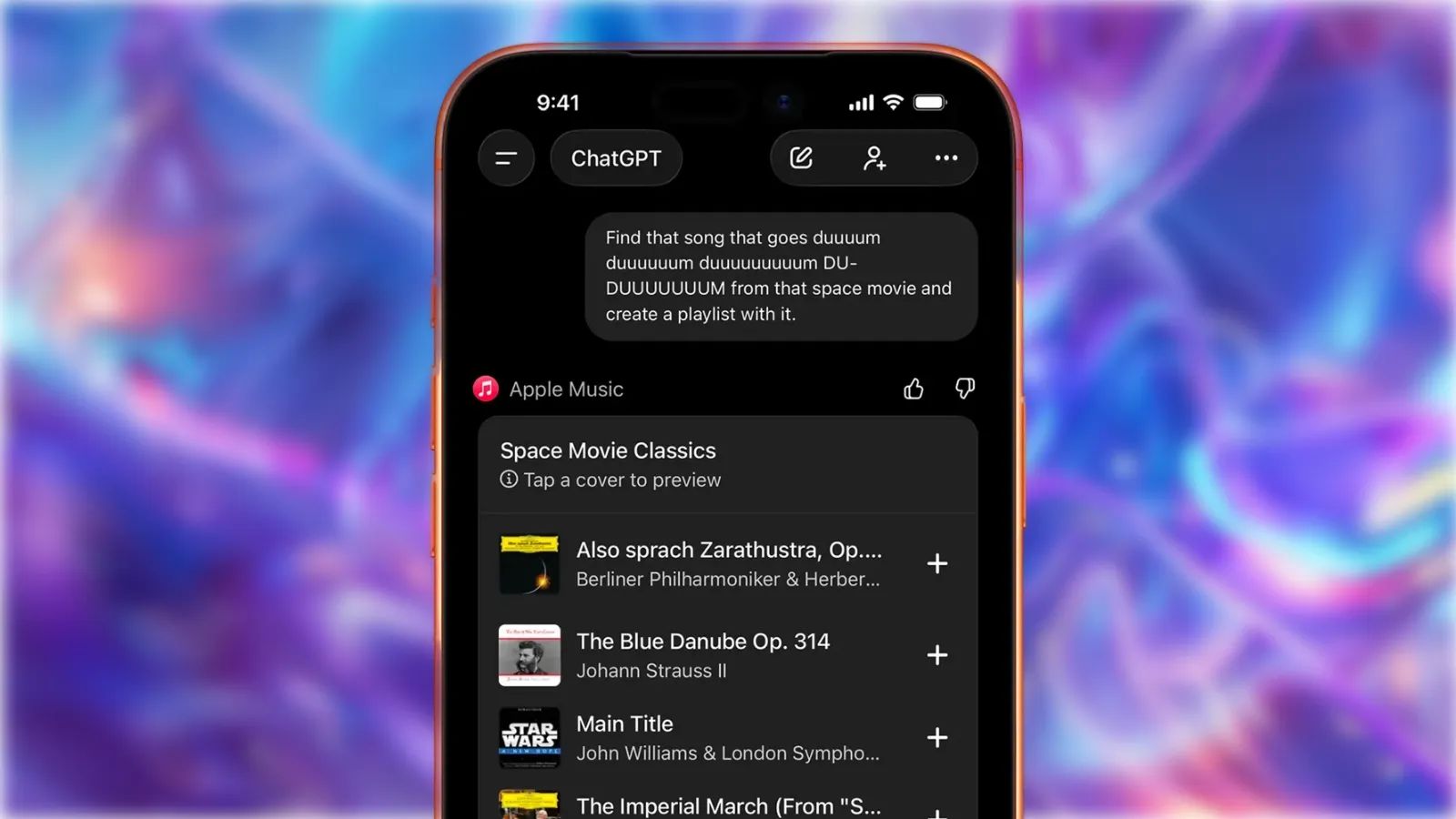

ChatGPT can now search Apple Music's entire catalog and build custom playlists based on nothing more than a conversational description. Instead of scrolling through genre tags or hoping an algorithm understands your taste, you describe exactly what you want, and ChatGPT finds it. The feature works through an extension that links your Apple Music subscription directly to OpenAI's chatbot, and the entire setup process takes roughly two minutes.
Key Takeaways
- Connect Apple Music to ChatGPT through Settings, then Apps, then Browse Apps
- Describe playlists using natural language like "upbeat indie rock for a road trip"
- Preview 30-second clips of every track before committing
- Save complete playlists directly to your Apple Music library with one tap
- The extension works on free and paid ChatGPT tiers
- An Apple Music subscription is required only for saving playlists and full playback
| Feature | Apple Music Alone | Apple Music + ChatGPT |
|---|---|---|
| Search Method | Keywords, genres, artists | Natural language descriptions |
| Discovery Style | Algorithm-driven suggestions | Conversational, context-aware |
| Playlist Creation | Manual song-by-song | AI-generated, instant batch |
| Preview Capability | Full tracks with subscription | 30-second clips for all users |
The integration lives in ChatGPT's Apps section, a relatively new feature that allows OpenAI's chatbot to connect with external services. Apple Music joins a growing list of connectors, but this particular pairing feels especially useful because playlist curation has always been tedious work. You either spend twenty minutes dragging individual songs around, or you rely on pre-made playlists that never quite match your specific mood.
Affiliate disclosure: some links in this article are Amazon Associate links. If you buy through them, Zone of Mac may earn a small commission at no extra cost to you, and we only recommend products that genuinely bring value to your Apple setup.
How to Connect Apple Music to ChatGPT
Open the ChatGPT app on your iPhone, iPad, or Mac. Tap your profile icon in the sidebar, then navigate to Account and select Apps. From there, tap Browse Apps and scroll until you find Apple Music. Select Connect, then Connect Apple Music, and follow the prompts to sign into your Apple Account.
The authentication process uses standard OAuth, so ChatGPT receives only the permissions necessary to search the catalog and add songs to your library. Your listening history stays private. ChatGPT cannot see what you have played previously, which means it generates recommendations based purely on your prompts rather than past behavior.
Once connected, the extension remains active across every device signed into your ChatGPT account. You perform the setup once, and the capability follows you to desktop, mobile, and web.
Writing Effective Prompts for Playlist Generation
The entire value proposition here hinges on how well you communicate with ChatGPT. Vague requests produce generic results. Specific, contextual prompts unlock genuinely useful playlists.
A prompt like "make me a playlist" returns something mediocre. A prompt like "instrumental jazz fusion tracks under six minutes with prominent saxophone, nothing too smooth" returns something far more targeted. ChatGPT understands tempo, mood, decade, instrumentation, and even conceptual themes like "songs that sound like driving through rain at night."
You can also stack criteria. Ask for "upbeat 1980s synth-pop songs that would work for a workout, excluding anything by Depeche Mode" and ChatGPT filters accordingly. The specificity of the request directly correlates with the quality of the output.
One friction point worth noting: ChatGPT occasionally includes tracks that are unavailable in your region or have been removed from Apple Music. The preview feature helps catch these before you save, so always tap through the suggestions before committing the playlist to your library.
Previewing and Saving Your Playlists
After ChatGPT generates a playlist, each track appears with a play button for a 30-second preview. You do not need an active Apple Music subscription to hear these clips, which makes the feature useful even for evaluating whether a playlist concept works before committing money.
If you do have a subscription, the "Create Playlist in Apple Music" button appears at the bottom of the list. Tapping it exports every track directly into your library as a new playlist. Individual songs can also be added using the plus button next to each track, which lets you cherry-pick favorites without importing everything.
The exported playlist appears in your Apple Music library within seconds, synced across all your devices. From there, you can rename it, reorder songs, or add more tracks manually.
Practical Use Cases Beyond Basic Discovery
The obvious application is mood-based playlists, but the integration supports more nuanced scenarios. Planning a dinner party and want background music that matches a specific cuisine? Ask for "Italian cafe ambiance, acoustic guitar and light vocals, nothing too uptempo." Trying to introduce a friend to a genre they have never explored? Request "entry points to progressive rock for someone who only listens to pop."
For Apple Music subscribers who already pay a monthly fee, having an AI assistant that can navigate the catalog using plain English represents a significant quality-of-life improvement. The service has over 100 million tracks, and traditional search interfaces make it almost impossible to find specific vibes without already knowing the artist or song name.
An Apple Gift Card gives you flexibility here. You can apply the balance toward an Apple Music subscription, fund in-app purchases for ChatGPT Plus if you want extended features, or simply keep it available for future Apple ecosystem spending. Here's where to get the Apple Gift Card (Email Delivery) https://www.amazon.com/dp/B08F3C99KN?tag=zoneofmac-20
Getting Better Sound From Your AI-Generated Playlists
Once you have a playlist worth keeping, the playback hardware matters. Apple Music supports Spatial Audio with Dolby Atmos and lossless audio, but you only hear those improvements through compatible equipment.
AirPods Pro 3 deliver the full Spatial Audio experience with head tracking, meaning the soundstage shifts as you move. The active noise cancellation on the third generation reduces up to twice as much ambient sound as the previous model, which makes a meaningful difference when listening in noisy environments. The H2 chip also enables Adaptive Audio, which blends noise cancellation and transparency based on your surroundings.
Beyond the technical specifications, the fit has improved. The silicone ear tips seal better, and the stems feel slightly more substantial in hand. Battery life remains around six hours with noise cancellation enabled, plus another thirty hours from the charging case. Here's where to get the AirPods Pro 3 https://www.amazon.com/dp/B0FQFB8FMG?tag=zoneofmac-20
Accessibility and Clarity
ChatGPT's interface presents playlists in a straightforward vertical list with clear labels for each track. Screen reader users navigating with VoiceOver will find the layout predictable: artist name, song title, and actionable buttons appear in a consistent order. The preview and save buttons use standard interactive elements rather than custom controls, which means assistive technologies recognize them without additional configuration.
For users with cognitive accessibility needs, the conversational prompt interface reduces the mental overhead of traditional playlist building. You do not need to remember specific song names, navigate nested menus, or understand Apple Music's categorization system. You describe what you want in your own words, and ChatGPT handles the translation.
One limitation: ChatGPT does not currently offer voice-only playlist creation within Apple Music itself. You must type or dictate your prompt in the ChatGPT app, then manually save the result. Users who prefer hands-free operation will need to wait for deeper Siri integration, which Apple has not yet announced for this workflow.
What ChatGPT Cannot Do With Apple Music
The extension cannot access your existing playlists, listening history, or library contents. It operates as a one-way street: you describe, it searches, you save. There is no "analyze my music taste and suggest something similar" functionality because ChatGPT lacks permission to read your account data.
You also cannot ask ChatGPT to modify playlists after they have been saved to Apple Music. Once exported, the playlist lives entirely within Apple's ecosystem, and any changes must happen there. Think of ChatGPT as a generator, not an ongoing curator.
Finally, the extension does not support Apple Music Classical searches at this time. Classical music queries return results from the main Apple Music catalog, but the specialized search capabilities of the Classical app remain inaccessible.
Quick-Action Checklist
- Open ChatGPT app on iPhone, iPad, or Mac
- Tap profile icon in sidebar
- Navigate to Account then Apps
- Tap Browse Apps
- Select Apple Music and tap Connect
- Sign in with Apple Account when prompted
- Return to main chat and type a playlist description
- Preview tracks using play buttons
- Tap Create Playlist in Apple Music to save
- Open Apple Music app to find your new playlist

Blaine Locklair
Founder of Zone of Mac with 25 years of web development experience. Every guide on the site is verified against Apple's current documentation, tested with real hardware, and written to be fully accessible to all readers.
follow me :
Related Posts
Seven Mac Accessories That Turn a Good Desk Into a Great One
Apr 10, 2026
Your Mac Has a Networking Time Bomb That Only a Reboot Defuses
Apr 09, 2026
Your Mac Feels Slow After macOS Tahoe — Here’s What Actually Fixes It
Apr 08, 2026