

🎧 Listen to this article
Prefer to listen? An audio version of this article is available for accessibility and convenience.
Dolby Atmos and Apple Spatial Audio are not two competing formats fighting for your ears. They are layers of the same system, and if you have AirPods connected to an Apple device, both are probably active right now without you realizing it. Spatial Audio is Apple’s umbrella technology for immersive, three-dimensional sound. Dolby Atmos is the specific audio format that provides the surround-sound mix for music, movies, and TV shows inside that umbrella. One is the engine; the other is the fuel.
The part that trips people up is the settings. Apple gives you three separate Dolby Atmos modes, two Spatial Audio toggles, and a head-tracking switch, all buried in different menus depending on whether you are on iPhone, Mac, or Apple TV. Get them wrong and your music sounds flat, or worse, artificially wide in a way that makes vocals feel like they are coming from behind your left shoulder. I spent more time than I want to admit toggling between “Automatic” and “Always On” before landing on the combination that actually sounds right on every pair of AirPods I own.
Apple’s support page on Spatial Audio with Dolby Atmos is the primary technical reference for how these two technologies interact, though even that page glosses over some of the practical edge cases that matter most.
 Ad
AdDolby Atmos Is the Mix, Spatial Audio Is the Delivery
Think of a Dolby Atmos track as a song that was mixed with individual instruments and vocal channels placed in specific positions around a virtual three-dimensional space. When a producer masters a track in Dolby Atmos using tools like Apple Logic Pro or Dolby Atmos Renderer, they decide exactly where the drums sit, where the backup vocals float, and how wide the reverb stretches. That positional information gets baked into the file.
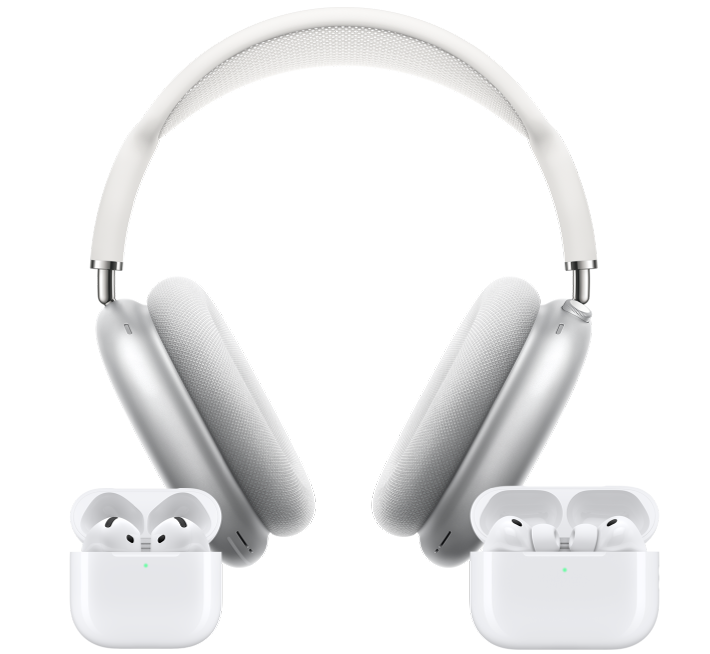
Apple Spatial Audio reads that positional data and translates it into what your AirPods or speakers actually produce. On AirPods Pro 3, AirPods Pro 2, AirPods 4, AirPods 3, and AirPods Max, Spatial Audio uses the accelerometers and gyroscopes inside the earbuds to track your head movement, adjusting the sound field in real time so that instruments stay anchored to fixed positions even when you turn your head.
Without Dolby Atmos content, Spatial Audio can still spatialize regular stereo tracks, but the effect is more subtle, like switching from mono to stereo rather than stepping inside a room.
The Three Dolby Atmos Modes on iPhone
Open Settings, then tap Apps, then Music, and scroll to the Audio section. You will find the Dolby Atmos toggle with three options.
Automatic is the default. It plays Dolby Atmos mixes only when your iPhone detects compatible headphones like AirPods Pro or AirPods Max, or when connected to a Dolby Atmos receiver. With wired headphones or third-party Bluetooth earbuds, Apple Music falls back to standard stereo. This is the safest choice for most people. It quietly gives you the best available version of every track without forcing a surround mix through speakers that were not designed for it.
Always On forces Dolby Atmos playback on every connected audio device, including wired headphones and third-party Bluetooth speakers that have no idea what to do with an Atmos signal. Apple says right on their support page that “not all speakers will play Dolby Atmos as intended” in this mode, which is putting it mildly. On my cheap desk speakers, Always On makes certain tracks sound hollow, like the vocals were pulled out of the center and redistributed to speakers that do not exist.
Off disables Dolby Atmos entirely. Every track plays in standard stereo regardless of what you are listening on. This is the mode for people who genuinely prefer traditional stereo mixes, or who are listening through high-end wired headphones where the stereo imaging is already exceptional and the Atmos remix introduces more distortion than depth.
My recommendation: leave it on Automatic unless you have a specific reason to override it.
This table compares the three Dolby Atmos playback modes available in Apple Music settings.
| Mode | Best For | Risk |
|---|---|---|
| Automatic | Most listeners with AirPods | None |
| Always On | Atmos-native speaker setups | Hollow audio on unsupported speakers |
| Off | Stereo purists, audiophile wired cans | Misses Atmos mixes entirely |
Fixed vs Head Tracked: The Spatial Audio Toggle You Probably Ignored
 Ad
AdHere is the setting that catches most people off guard. When you have AirPods connected and you open Control Center on your iPhone, press and hold the volume slider, and you will see the Spatial Audio icon at the bottom. Tap it and you get three choices: Off, Fixed, and Head Tracked.
Fixed enables Spatial Audio without any head movement response. The surround field stays static relative to your ears. This is what most headphone listeners actually want for music, because vocals stay centered and instruments do not shift when you glance at your phone.
Head Tracked adds the motion-sensing layer. The sound anchors to your device’s position, so if you turn your head to the right, the audio feels like it stays in front of you. This is brilliant for watching movies on iPad or Apple TV because dialogue stays pinned to the screen. For music, though, Head Tracked can feel disorienting. Drums shift when you look down at your keyboard. Vocals slide sideways when you check the time. Some people love this immersive quality. I find it distracting for anything other than film.
The setting saves per app, which is genuinely helpful. You can leave Head Tracked on for the Apple TV app and Fixed for Apple Music, and your AirPods will remember.
Your AirPods Model Decides What You Actually Hear
Not every pair of AirPods handles Spatial Audio the same way, and Apple does not make this as clear as it should.
AirPods Pro 3 and AirPods Pro 2 support Spatial Audio with dynamic head tracking and Personalized Spatial Audio, which uses your iPhone’s TrueDepth camera to scan your ear geometry and build a custom audio profile. If you have not run this calibration scan, open Settings, tap your AirPods name, and look for Personalized Spatial Audio. The scan takes about sixty seconds and the difference is worth every one of them. Without it, the Atmos mix uses a generic head-related transfer function that might not match your ear shape at all.
AirPods Max support everything the Pro models do, with the added benefit of larger drivers that can physically reproduce a wider soundstage. The USB-C version of AirPods Max also supports Spatial Audio over a wired connection to devices running iOS 26 or macOS Tahoe, which is a detail Apple barely mentioned at launch.
AirPods 4 and AirPods 3 support Spatial Audio with head tracking, but they lack active noise cancellation, which means more ambient sound leaks in and competes with the spatial positioning. The effect is still noticeable, just less precise in noisy environments.
If you own AirPods that shipped before the third generation, you get standard stereo only. No Spatial Audio, no head tracking, no Dolby Atmos rendering. It is worth knowing this before you spend time hunting for settings that simply do not exist on older hardware.
Where Spatial Audio Goes Beyond Music
Dolby Atmos is the format that dominates the music conversation, but Apple Spatial Audio works with more than just Apple Music.
Every movie and TV show on Apple TV+ is mixed in Dolby Atmos. Netflix, Disney+, HBO Max, and most major streaming services also deliver Atmos audio on Apple devices. When you watch something in the Apple TV app on your iPhone or iPad with AirPods connected, Spatial Audio with head tracking anchors the dialogue to the screen automatically. If you have ever noticed that voices seem to come from your device even though you are wearing headphones, that is Spatial Audio doing its job.
FaceTime calls use Spatial Audio to separate voices when you are on a group call, positioning each person’s voice in a slightly different part of the stereo field. It is subtle, but once you notice it, group calls without it feel noticeably cluttered.
Gaming on Apple Arcade and supported third-party games also benefits. The positional audio cues in a game feel genuinely different with Spatial Audio enabled.
Apple has also introduced the Apple Spatial Audio Format, a newer codec that extends beyond Dolby Atmos specifically for visionOS on Apple Vision Pro. This format uses the APAC codec at up to 768 kilobits per second and can be authored in Apple Logic Pro or DaVinci Resolve Studio. For most AirPods users, Dolby Atmos remains the format you will encounter day-to-day, but the existence of ASAF signals where Apple is taking spatial audio next.
The Settings That Actually Matter
If you walked away from this article and changed only three things, here is what I would pick.
First, make sure Dolby Atmos is set to Automatic in Settings > Apps > Music. This gives you Atmos on compatible hardware and clean stereo everywhere else.
Second, run the Personalized Spatial Audio scan if you have AirPods Pro or AirPods Max. Go to Settings, tap your AirPods, and look for Personalized Spatial Audio. The difference between a generic profile and a custom one is not subtle. Instruments that sounded vaguely “around you” will snap into specific positions.
Third, set your Spatial Audio preference per app using Control Center. Press and hold the volume slider with your AirPods connected, tap the Spatial Audio icon, and choose Fixed for music and Head Tracked for video. Your AirPods remember these preferences, so you only do this once.
One thing I would skip: the “Always On” Dolby Atmos mode. Unless every audio device you own supports Atmos natively, this setting creates more problems than it solves. The Automatic mode already handles the switching for you.
If you have already set up Spatial Audio on your AirPods for Apple Music, Netflix, and Spotify, the Dolby Atmos settings layer on top of that foundation. And if you ran the calibration scan from our AirPods sound calibration guide, you are already getting the personalized profile that makes all of this sound its best. The relationship between these two technologies is simpler than Apple’s scattered settings menus make it appear: Dolby Atmos is the content, Spatial Audio is the platform, and your AirPods are the instrument that brings both to life.

Related Posts
Your AirPods Max Are Collecting Grime You Cannot See
Mar 04, 2026
Your AirPods Have Dozens of Hidden Settings on Your iPhone — Here Is Every One
Mar 03, 2026
Your AirPods Have Three Spatial Audio Modes You Probably Never Switched
Mar 03, 2026