

ecording ProRes video directly to an external SSD transforms iPhone 17 Pro from a capable smartphone camera into a legitimate filmmaking tool. The internal 256GB or 512GB storage that ships with most iPhone models fills within minutes when shooting 4K60 ProRes, but connecting a high-performance Thunderbolt 5 drive removes that ceiling entirely. You capture as much footage as the drive holds, your iPhone runs cooler without writing constantly to internal NAND, and transferring rushes to your Mac happens at speeds exceeding 6,000 MB/s.
Key Takeaways
- ProRes 422 HQ at 4K60 generates approximately 6 GB per minute, filling even a 512GB iPhone in under 90 minutes of continuous shooting.
- External SSD recording reduces iPhone thermal load by offloading write operations, enabling longer uninterrupted takes.
- Thunderbolt 5 drives delivering 6,000+ MB/s provide massive future-proofing as iPhone recording capabilities expand.
- These drives work flawlessly with iPhone via USB-C backward compatibility and unlock full Thunderbolt 5 speed on M4 Pro and M4 Max Macs.
- IP67/IP68 rated drives with drop protection survive location shooting without protective cases.
- Format drives as APFS on Mac before iPhone use for optimal compatibility and allocation efficiency.
At-A-Glance: Thunderbolt 5 SSD Options for iPhone 17 Pro
The following table compares key attributes across recommended drives to help match your workflow needs with the right hardware.
| Drive | Interface | Sequential Speed | Best For |
|---|---|---|---|
| OWC Envoy Ultra (4TB) | Thunderbolt 5 | 6,000+ MB/s | Maximum speed, built-in cable |
| LaCie Rugged SSD Pro5 (4TB) | Thunderbolt 5 | 6,700 MB/s read / 5,300 MB/s write | Extreme durability, harsh environments |
| Sabrent Rocket XTRM 5 (4TB) | Thunderbolt 5 | Up to 64 Gbps transfer | Broad compatibility, value |
Why ProRes Recording Demands Serious Storage
ProRes exists because compressed codecs like H.265 sacrifice latitude for file size. When you grade footage in DaVinci Resolve or Final Cut Pro, ProRes preserves highlight detail, shadow information, and color accuracy that compressed formats discard. The tradeoff is data volume. ProRes 422 HQ at 4K60 writes roughly 6 GB per minute of footage. A ten-minute interview consumes 60 GB. A wedding ceremony lasting 45 minutes burns through 270 GB before the reception begins.
Internal iPhone storage cannot sustain this for extended shoots. Beyond capacity limits, writing large volumes of data generates heat. The A18 Pro chip throttles performance when temperatures climb, and sustained internal writes accelerate that thermal curve. Recording to an external SSD shifts write operations outside the phone chassis, keeping the processor cooler and enabling longer continuous recording without thermal interruption.
While iPhone 17 Pro connects via USB-C at USB 3.2 Gen 2 speeds during recording, choosing Thunderbolt 5 drives means your storage investment transfers to Mac workflows at full 80 Gbps bandwidth. When connected to an M4 Pro MacBook Pro or M4 Max Mac Studio, these drives deliver speeds exceeding 6,000 MB/s. That means copying an hour of 4K60 ProRes footage takes under two minutes rather than the twenty minutes older USB drives require.
What Makes a Thunderbolt 5 Drive Worth the Investment
Thunderbolt 5 represents the current pinnacle of external storage connectivity. Apple's M4 Pro and M4 Max chips include Thunderbolt 5 ports delivering 80 Gbps bidirectional bandwidth with 120 Gbps capability for display connections. Drives built for this standard provide speeds that match or exceed internal Mac storage, eliminating external drives as workflow bottlenecks.
Sustained write performance matters more than peak specifications. Marketing materials advertise maximum sequential speeds achieved under ideal conditions for brief intervals. Video recording demands consistent throughput across extended durations. All three recommended Thunderbolt 5 drives maintain their rated speeds during continuous writes because they were designed for professional video workflows.
Thermal management determines whether rated speeds hold under load. These drives use finned aluminum enclosures, active thermal regulation, or advanced passive cooling to dissipate heat during sustained operation. Recording several hours of ProRes footage generates substantial thermal load, and Thunderbolt 5 drives handle this without throttling.
Backward compatibility ensures these drives work everywhere. When connected to iPhone 17 Pro via USB-C, they operate at USB 3.2 Gen 2 speeds. Connected to older Macs with Thunderbolt 3 or Thunderbolt 4, they negotiate the best available speed. Only Thunderbolt 5 hosts unlock their full capability, but you never face compatibility issues regardless of connection.
Affiliate disclosure: some links in this article are Amazon Associate links. If you buy through them, Zone of Mac may earn a small commission at no extra cost to you, and we only recommend products that genuinely bring value to your Apple setup.
Join The Inner Circle For Serious Apple Users
Exclusive Apple tips. Free to join.
OWC Envoy Ultra: The Speed Champion
OWC established its reputation building storage solutions for Mac professionals over three decades. The Envoy Ultra represents their flagship Thunderbolt 5 portable SSD, delivering over 6,000 MB/s sequential reads and writes. This speed matches internal Mac SSD performance, meaning editing directly from the Envoy Ultra feels identical to working from your boot drive.
The integrated Thunderbolt 5 cable eliminates cable compatibility concerns entirely. You never hunt for the right cable or wonder whether a generic USB-C cable supports full Thunderbolt speeds. The encapsulated cable design also enables IP67 water and dust resistance, protecting the drive during outdoor location work. OWC rates the Envoy Ultra for drop protection and crush resistance, backed by their 5-year warranty.
Bus-powered operation means no external power supply clutters your kit. The fanless aluminum design dissipates heat silently through passive fins. At 4TB capacity, the Envoy Ultra stores approximately 11 hours of 4K60 ProRes 422 HQ footage, enough for multi-day shoots without emptying the drive.



Get the OWC Envoy Ultra 4TB SSD here (Amazon Affiliate Link): https://www.amazon.com/dp/B0DMTTTCM2?tag=zoneofmac-20
LaCie Rugged SSD Pro5: Extreme Durability for Field Work
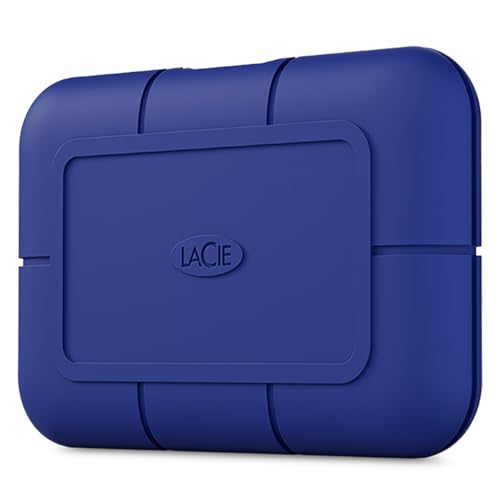
LaCie's Rugged series has been the default choice for film and television production for over two decades. The Rugged SSD Pro5 brings Thunderbolt 5 speeds to their most durable enclosure yet, rated IP68 for complete dust protection and water submersion to 1.5 meters for 30 minutes. Drop the drive from three meters onto concrete, or park a car on it, and your footage survives.
The Pro5 delivers 6,700 MB/s reads and 5,300 MB/s writes, making it the fastest drive in this roundup. LaCie designed the thermal system specifically for sustained high-bitrate video workloads, with testing validated against 8K multi-stream editing scenarios far more demanding than iPhone ProRes recording. The blue rubberized bumper provides both shock absorption and distinctive visual identification in crowded gear bags.
Seagate backs the Pro5 with their Rescue Data Recovery service, providing professional data recovery assistance if the drive ever fails. The included Adobe Creative Cloud subscription adds software value beyond the hardware itself. For productions where environmental conditions threaten equipment survival, the Pro5 offers insurance that cheaper drives cannot match.
Use this link to buy the LaCie Rugged SSD Pro5 (4TB) (Amazon Affiliate Link): https://www.amazon.com/dp/B0DJ9LTJCY?tag=zoneofmac-20
Sabrent Rocket XTRM 5: Versatile Performance at Compelling Value
Sabrent built the Rocket XTRM 5 for users who want Thunderbolt 5 performance without paying flagship prices. The drive connects at up to 80 Gbps with transfer speeds reaching 64 Gbps, placing it firmly in professional territory while maintaining accessibility for independent creators and hobbyist filmmakers.
The aluminum construction serves dual purposes: superior heat dissipation during sustained writes and physical durability during transport. Sabrent includes a silicone sleeve for additional drop and environmental protection, letting you choose between maximum cooling and maximum ruggedness depending on shooting conditions. The external activity LED and S.M.A.R.T. monitoring via Sabrent's software provide drive health visibility that budget alternatives often omit.
Backward compatibility spans Thunderbolt 3, Thunderbolt 4, USB4, and USB 3.2 connections at their respective maximum speeds. This broad compatibility means the Rocket XTRM 5 works with virtually any Mac or iPad Pro you own now or purchase in the future. Sabrent includes a certified Thunderbolt cable in the box, eliminating the common frustration of discovering your existing cables cannot sustain advertised speeds.
Here's where you can buy the Sabrent Rocket XTRM 5 (4TB) (Amazon Affiliate Link): https://www.amazon.com/dp/B0F7P6DZGR?tag=zoneofmac-20
Workflow Optimization Beyond Hardware Selection
Owning capable hardware represents half the equation. The other half involves workflow practices that maximize reliability and minimize time spent troubleshooting rather than creating.
Format drives on Mac rather than iOS. While iPhone can format drives as APFS, doing so on Mac allows you to configure optimal allocation block sizes for video files. This reduces file fragmentation during long recording sessions and improves subsequent playback smoothness during editing.
Use Velcro straps or cable clips to secure the connection between iPhone and SSD, especially when shooting handheld or during movement. Even certified cables can jostle loose during aggressive panning or when walking between locations. A secure connection eliminates most random disconnection issues that derail otherwise successful shoots.
Treat external SSDs like camera memory cards rather than archival storage. At the end of each shooting day, copy footage to at least one additional location before clearing the SSD for reuse. Drives fail eventually. Having a reliable backup habit prevents catastrophic data loss when hardware malfunctions.
Test new drives before critical shoots. When you purchase a new SSD, record 30-60 minutes of test footage and review it frame-by-frame before trusting the drive on paid work. This identifies any compatibility quirks or performance issues in a controlled environment rather than during a client interview or wedding ceremony.
Accessibility and Clarity
External SSD workflows introduce unique considerations for iPhone users with visual or physical limitations.
VoiceOver users benefit from the tactile distinction between different drive models. The LaCie Rugged Pro5's rubberized bumpers and Sabrent Rocket XTRM 5's aluminum body with optional silicone sleeve provide distinct physical feedback when selecting drives from a bag without visual confirmation. The OWC Envoy Ultra's integrated cable creates a recognizable form factor unlike any competing drive.
For users with reduced fine motor control, the Sabrent Rocket XTRM 5's included silicone sleeve adds grip that prevents the drive from slipping during one-handed connection. The OWC Envoy Ultra's permanently attached cable means one fewer loose component to manage when setting up recording.
Cable management directly affects accessibility. Users with limited dexterity find that securing cables with Velcro straps reduces fumbling compared to letting cables hang freely. When mounting your iPhone on a gimbal or cage rig with the SSD clipped to your belt, that extra cable length matters for users who cannot easily adjust connector positioning mid-shot.
Screen reader compatibility in iOS extends to external storage notifications. When an SSD connects or disconnects, VoiceOver announces the event clearly. Testing drives with VoiceOver enabled before critical shoots identifies which models provide the most accessible feedback during edge cases like thermal warnings or performance degradation messages.
Record Without Limits
The evolution from experimental external recording to reliable professional iPhone ProRes workflows happened faster than most anticipated. Thunderbolt 5 drives represent the current state of the art, and choosing this generation of storage ensures your investment remains relevant as Apple continues expanding iPhone video capabilities.
If your priority is seamless Mac integration with cable-free simplicity, the OWC Envoy Ultra delivers internal-SSD speeds in a rugged, waterproof package with the cable permanently attached. When shooting environments involve weather exposure, impact risks, or the chaos of documentary production, the LaCie Rugged Pro5 offers IP68 durability and the fastest speeds available. For creators who want Thunderbolt 5 capability at accessible pricing with exceptional cross-platform compatibility, the Sabrent Rocket XTRM 5 provides professional performance without flagship cost.
Your equipment should keep pace with your vision. When storage constraints no longer dictate creative decisions, filming becomes effortless, and every moment captured remains exactly as vivid as the scene demanded.

Related Posts
iOS 26.4.1 Fixes the iCloud Bug That Broke Your Apps
Apr 09, 2026
iOS 26.4 Drains Your iPhone Battery. Here’s What Fixes It
Apr 09, 2026
Your iPhone Finally Lets You Create Custom Ringtones in iOS 26
Apr 08, 2026