
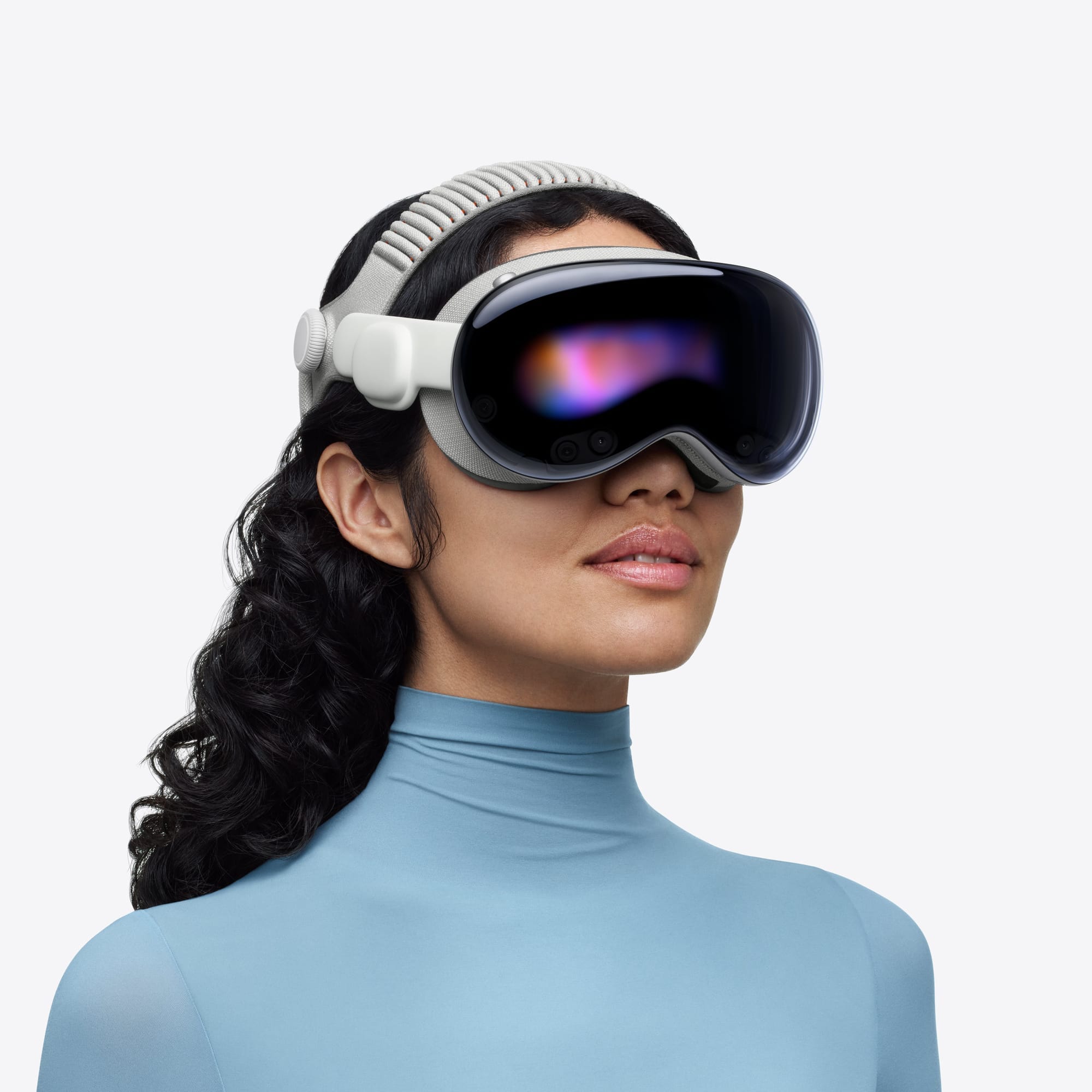

Apple Vision Pro is alive, updated, and still costs $3,499. The M5 chip that quietly replaced the original M2 last October made the headset sharper, faster, and about thirty minutes longer on battery, but most of the coverage stopped at the spec sheet. Here's the thing, though: the real changes aren't in the silicon. They're in what visionOS 26 lets you do with it, and the gap between a Vision Pro collecting dust on a shelf and one that genuinely replaces two monitors on your desk comes down to about fifteen minutes of configuration that the setup wizard never walks you through.
Two years after launch, the conversation around Vision Pro has split into two camps: people declaring it dead and people who actually wear one for work every day. I'm not in either camp, exactly. The product has real problems, genuine limitations, and a price tag that makes your wallet flinch. But it also got meaningfully better since October 2025 in ways that don't show up in headlines, and if you own one or are seriously considering it, the next few minutes of reading will save you hours of digging.
Read on.
The M5 Upgrade Apple Barely Promoted
Apple's October 2025 announcement landed with a whisper. No keynote stage, no dramatic lighting, no "one more thing." The company updated Vision Pro to the Apple M5 chip, swapped the default headband to a new Dual Knit Band, and moved on. That low-key approach tells you something about where Apple thinks this product sits right now, but the actual improvements are more substantial than the launch energy suggested.
The M5 brings a 10-core CPU, a 10-core GPU with hardware-accelerated ray tracing and mesh shading, and a 16-core Neural Engine built on third-generation 3-nanometer technology. In practical terms, that means 10% more pixels rendered on those dual micro-OLED displays, a jump from 100 Hz to 120 Hz maximum refresh rate, and AI-powered features running up to 50% faster. The battery now lasts up to three hours of video playback, up from two and a half.
Honestly? The refresh rate bump is what you notice first. Scrolling through visionOS at 120 Hz versus the old 100 Hz ceiling isn't a revolution, but it removes a subtle lag that you didn't realize was bothering you until it disappeared. Text looks cleaner. Spatial windows feel more anchored. The R1 chip still handles all sensor processing within 12 milliseconds, so the passthrough image stays responsive, but the extra frames make the whole experience feel less like wearing a computer and more like looking through a very expensive pair of glasses.
The Dual Knit Band deserves its own paragraph. Seriously. The original Solo Knit Band pressed most of the headset's weight into your forehead, which got uncomfortable after about forty minutes. The Dual Knit Band distributes weight across both the top and back of your head with a 3D-knitted structure and tungsten inserts in the lower strap for counterbalance. If you still own an M2 Vision Pro, you can buy the Dual Knit Band separately for $99, and I'd argue it's the single best upgrade you can make. Comfort determines whether this thing sits on your face for twenty minutes or two hours.
What visionOS 26 Actually Does Differently
Spatial Widgets changed how the home environment works. You can now place widgets on walls and tables in your physical space, and they stay there. Not "stay there until you take the headset off" but genuinely persist across sessions, across restarts, across days. A weather widget pinned to the wall above your desk, a music controller on the coffee table, a clock near the door. visionOS builds a spatial map of your room and remembers where you put everything. If you've been using Vision Pro as a Mac Virtual Display replacement but ignoring widgets, you're leaving half the spatial computing promise untouched. We covered how to set up spatial widgets in detail last month.
YouTube arrived on February 12, 2026. That sentence alone justifies updating. For two years, the biggest video platform on Earth forced Vision Pro owners into Safari to watch content. The native app now supports 3D, 360-degree, and VR180 content on a theater-sized virtual screen, and M5 owners get 8K playback. The Spatial tab surfaces immersive content that Safari never could, and offline downloads work with a YouTube Premium subscription.
Then there's foveated streaming, coming in visionOS 26.4 (currently in beta as of February 16, 2026). This is the feature that could genuinely expand what Vision Pro does. Foveated streaming prioritizes resolution and compression quality in the exact region where your eyes are focused, which means apps can stream high-quality VR content from a local PC or cloud server without drowning the headset's video decoder. It supports NVIDIA CloudXR and enables hybrid rendering, where part of a scene renders locally through RealityKit while processor-intensive elements stream from a remote machine. A flight simulator rendering its cockpit locally while streaming landscape from a gaming PC is the kind of use case that makes this worth watching.
M2 vs. M5: What Actually Changed at a Glance
The 'Discontinued' Question, Answered
Search "Apple Vision Pro discontinued" and you'll find a flood of results. Let me cut through it: the original M2 model is discontinued. Production stopped in late 2024 after selling roughly 390,000 units worldwide. IDC estimated Apple shipped just 45,000 units in Q4 2025. Those are not blockbuster numbers.
But the product line itself is not dead. Apple released the M5 refresh in October 2025, and you don't invest engineering resources in a new chip, a new headband, and a global retail launch for a product you're about to kill. Apple continues shipping visionOS updates on the same cadence as iOS, macOS, and watchOS. The 26.3 update landed February 11, 2026 with security patches, and the 26.4 beta is already in developer hands.
What has changed is Apple's broader strategy. Bloomberg reported in October 2025 that Apple paused development on both a next-generation high-end headset and the rumored lower-cost "Vision Air" (expected around $1,500 to $1,799) to redirect engineering talent toward AI-powered smart glasses codenamed N50. Those glasses, which reportedly won't even have a display, could preview as early as late 2026 with a launch in 2027. So the future of Apple's spatial computing efforts may look more like a pair of regular glasses than a ski goggle, but the current Vision Pro isn't going anywhere while that transition plays out.
Accessibility and Clarity: Who This Headset Works For
Vision Pro's accessibility suite is the most comprehensive on any headset, and it's not particularly close. VoiceOver works through pinch gestures rather than requiring hand tracking precision, which matters for users with motor impairments. Pointer Control lets you navigate with head movements, wrist movements, or a single index finger. Dwell Control pairs with eye tracking to provide tap, scroll, long-press, and drag actions using only your gaze, no hand movement required at all.
The cognitive accessibility picture is more mixed. visionOS 26 keeps the information architecture flat and predictable, which helps users with ADHD or processing differences. But the sheer density of spatial elements, widgets, windows floating at different depths, environmental immersion settings, can create cognitive overload if you enable everything at once. Smart Color Invert and Reduce Transparency help with visual clarity, but Apple hasn't shipped a "simplified mode" that strips the interface down to essentials. If you're sensitive to visual complexity, start with a single app window in a minimal environment and add elements gradually.
The weight remains a genuine concern. Even with the Dual Knit Band, 600 grams on your face for extended sessions causes neck fatigue. That's a physical accessibility barrier Apple hasn't solved yet and won't solve until the hardware gets substantially lighter.
Your Vision Pro Setup Checklist for 2026
Whether you just unboxed an M5 or you've had your M2 since launch day, these are the settings and features worth configuring right now. Consider this your reward for reading through the context that explains why each one matters.
- Update to visionOS 26.3 (Settings, General, Software Update). This patches critical security vulnerabilities and fixes stability issues with spatial widget persistence.
- Buy or attach the Dual Knit Band ($99 if purchased separately). The comfort difference between the Solo and Dual bands determines whether you use Vision Pro for minutes or hours.
- Configure Mac Virtual Display by looking at your Mac while wearing Vision Pro. Drag the virtual display wider for an ultrawide workspace that replaces dual physical monitors.
- Place Spatial Widgets on walls and tables (long-press in your environment). Pin a clock, weather, music controls. They persist across restarts.
- Install the YouTube app from the visionOS App Store. Browse the Spatial tab for 3D and immersive content. M5 owners get 8K playback.
- Enable Dwell Control for hands-free sessions (Settings, Accessibility, Pointer Control). Pair it with eye tracking to navigate without lifting a finger.
- Set up Personas if you haven't since visionOS 26 overhauled them. The new volumetric rendering with ML-driven hair and skin accuracy makes FaceTime calls significantly less uncanny.
- Try PlayStation VR2 controllers ($249.95) if you game. Physical controllers for spatial games are a different experience than hand tracking alone.

Blaine Locklair
Founder of Zone of Mac with 25 years of web development experience. Every guide on the site is verified against Apple's current documentation, tested with real hardware, and written to be fully accessible to all readers.
follow me :
Related Posts
Galaxy XR vs Apple Vision Pro: An Apple Owner's Honest Verdict
Feb 27, 2026
Replace Two Monitors With Vision Pro Mac Virtual Display
Feb 05, 2026
Set Up PlayStation VR2 Controllers on Vision Pro for Gaming
Jan 29, 2026